Best App to Store Travel Documents (2026)
The best app to store travel documents on iPhone: passport, visas, insurance and boarding passes. NomadPoint, Apple Wallet, TripIt and Files compared.
 By Elad · Nov 19, 2026 · 7 min read
The best app to store travel documents on iPhone is NomadPoint (we make it). It keeps your passport next to the flights and stays of your trip, and uses it to check the entry rules for where you're going. Storing your passport is free. Visas, insurance and boarding passes sit next to it with NomadPoint Pro.
The short answer:
- NomadPoint if you want your documents tied to the trip, with a check that your passport is valid for it. iPhone, iPad, Mac and Apple Watch.
- Apple Wallet for the boarding pass itself, when your airline offers one, and for a US Digital ID at TSA.
- TripIt if you want files attached to each trip and you also use Android. Free gets 3 documents per trip, Pro gets 25.
- Files or Notes for a free, plain backup scan of anything.
Every price and feature below comes from each company's own pages and the US App Store, checked on 19 November 2026.
What counts as a travel document
For most trips you need:
- Passport (or a national ID card where it's accepted).
- Visa or travel authorisation, if your passport needs one for that country.
- Travel insurance policy, some countries ask for proof.
- Boarding passes and booking confirmations.
- Sometimes a return ticket, proof of where you're staying, or an arrival card.
An app stores copies. At the border, officials want the physical passport. Treat everything on your phone as a backup and a way to find things fast.
Travel document apps compared
| NomadPoint | Apple Wallet | TripIt | Files or Notes | |
|---|---|---|---|---|
| Passport copy | Yes, free | No (US Digital ID is not a passport) | As an uploaded file | As a scan |
| Visas and insurance | Pro | No | As uploaded files | As scans |
| Boarding passes | Pro | Yes, if your airline supports Wallet | As uploaded files | As scans |
| Checks entry rules for your passport | Yes (1 destination free, all with Pro) | No | No | No |
| Linked to your trip | Yes | No | Yes | No |
| Free limit | Passport | Free | 3 documents per trip | Free |
| Paid plan (US) | $39.99 a year, 7-day trial | None | $49 a year | None |
| Android | No | No | Yes | No |
Sources: NomadPoint pricing, Apple: boarding passes in Wallet, Apple: Digital ID in Wallet, TripIt pricing, TripIt Pro.
1. NomadPoint: documents that know where you're going
NomadPoint is a trip planner. Flights, stays and activities sit in one journey, and your documents sit with them.
How to add your passport:
- Open the Status tab and find Documents.
- Tap + and choose your passport.
- Take a photo of the photo page, or pick a PDF.
- Check the number and dates the app filled in, then save.
Once it's stored, the passport does work for you. Each country you're going to gets an entry page that reads your passport: visa-free or not, how many days you can stay, and what you still need.
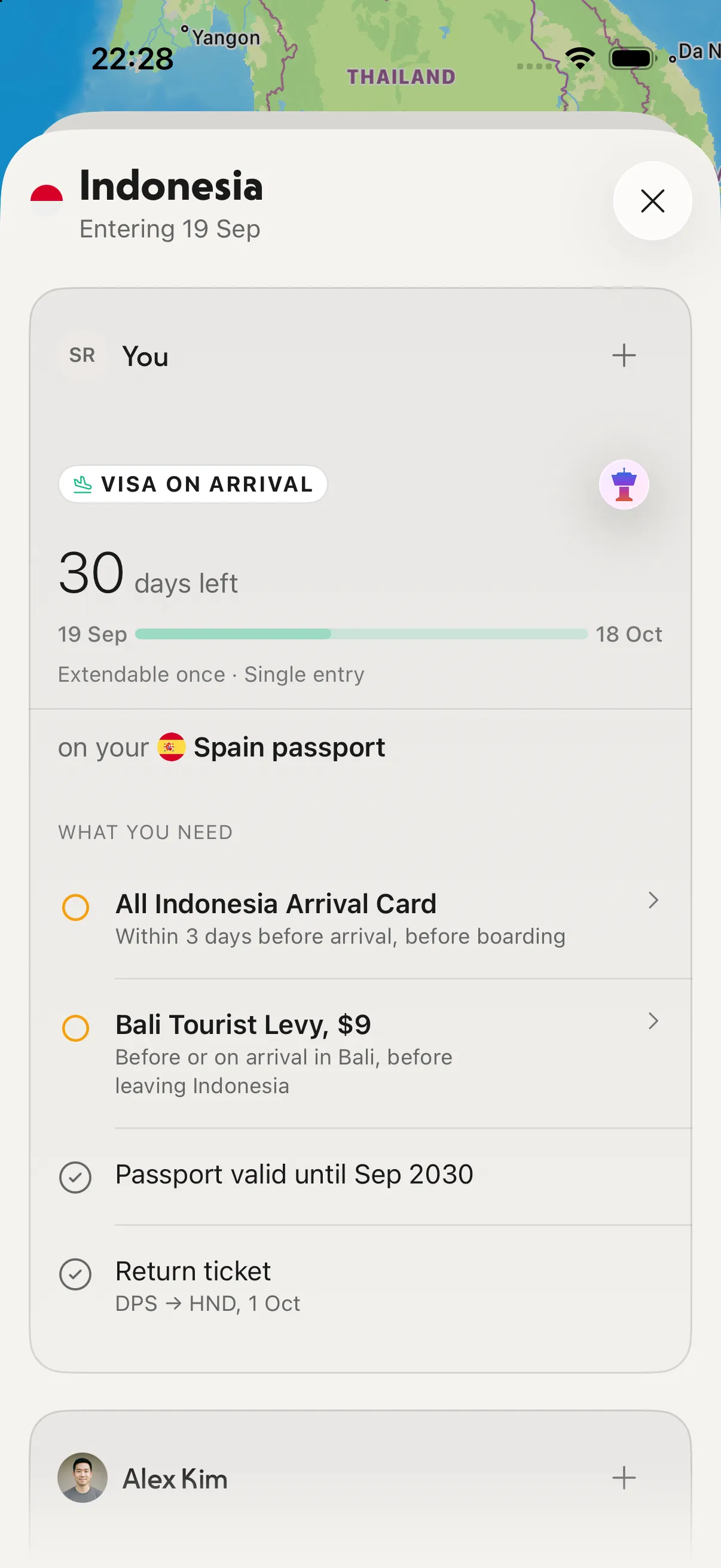
The entry page: your passport checked against the trip, plus what else to bring.
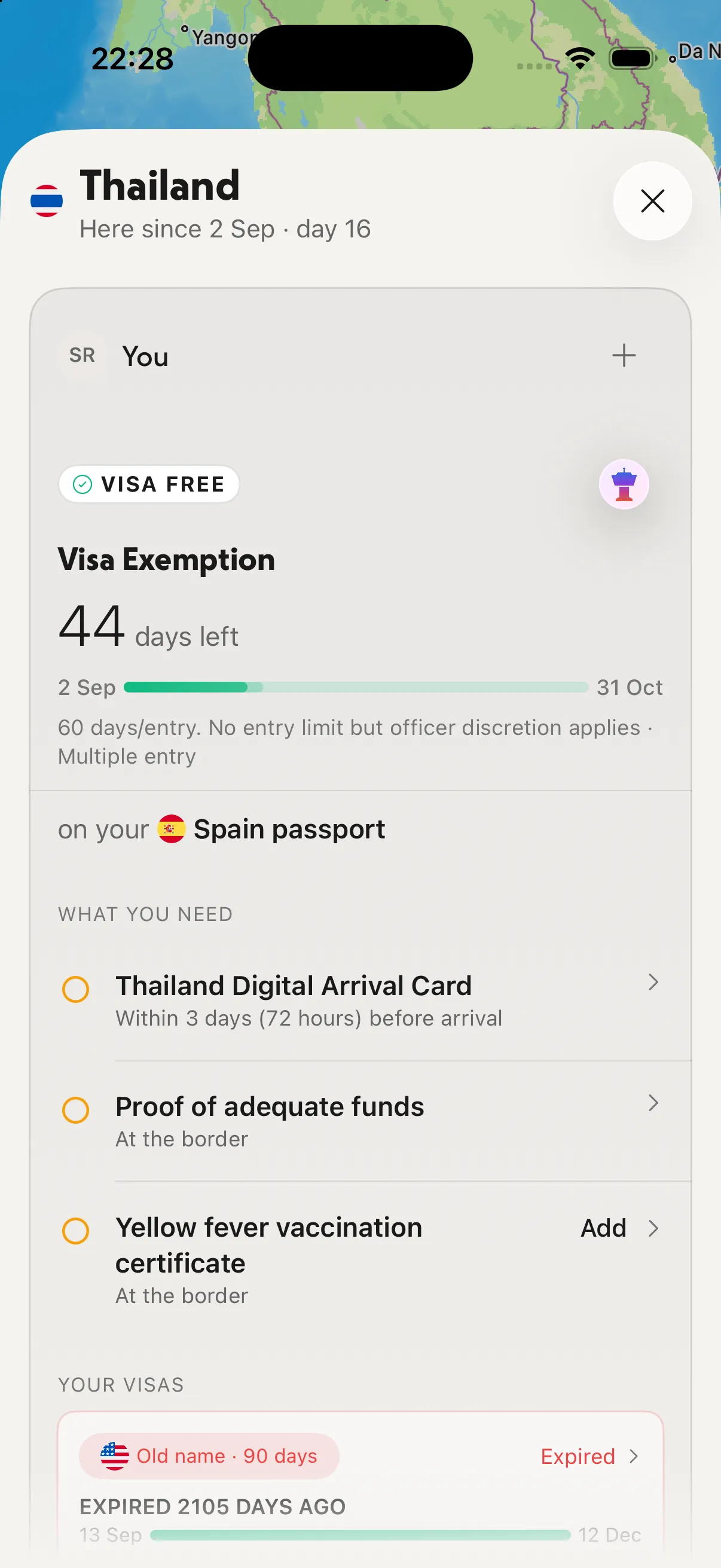
The passport you stored decides the rule: here, 44 days visa-free on a Spain passport.
On travel day the Status screen sums it up: your next flight, whether entry requirements are met, and when check-in opens.
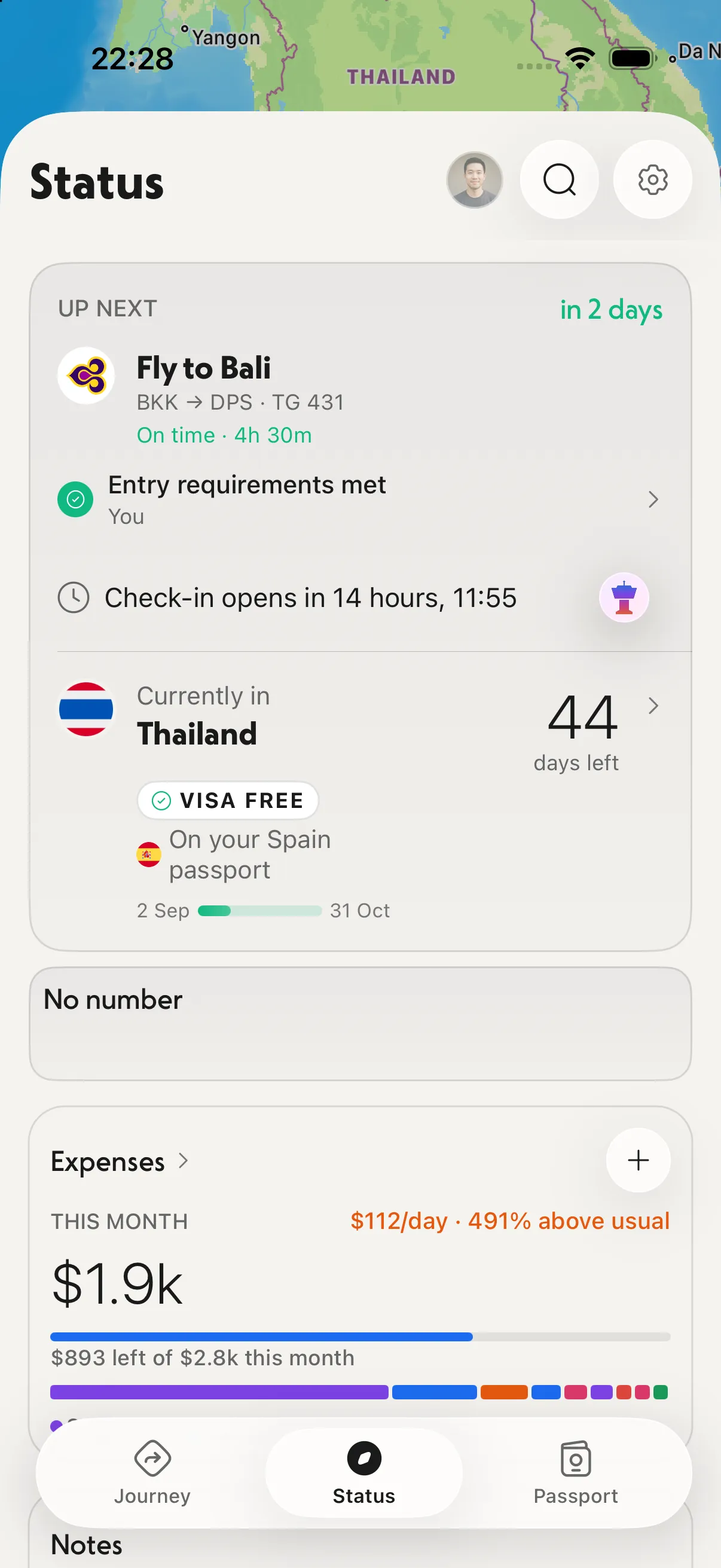
Status: the next flight and whether your documents are in order for it.
Free: your passport, entry rules and days left for one destination, unlimited journeys, offline.
With Pro: visas, insurance and boarding passes stored next to your passport, a second passport with entry rules compared for both, entry rules for every destination, and an alert before a visa or stay allowance runs out. Pro is $39.99 a year with a 7-day free trial in the US, $7.99 a month, $2.99 a week, or $149.99 once (see pricing).
Where it falls short, honestly: there's no Android app, and it doesn't put boarding passes into Apple Wallet for you. If your airline offers a Wallet pass, use that at the gate.
For the passport alone, our guide to storing your passport on iPhone goes step by step. To check validity before you book, read the passport 6-month rule.
2. Apple Wallet: best for the boarding pass itself
Wallet is already on your iPhone. You add a boarding pass by tapping Add to Apple Wallet in the airline's app or email, and Apple says it then shows up on your paired Apple Watch too. At the gate you open Wallet and scan.
The limits: only eligible boarding passes can be added, so it depends on your airline. Wallet doesn't hold a visa or an insurance policy.
If you have a US passport, Wallet can also hold a Digital ID made from it. Apple says it works at select TSA checkpoints for domestic travel, and that it "cannot be used to perform functions of a passport like international travel and border crossing." See Apple's Digital ID page.
3. TripIt: documents attached to each trip
TripIt builds an itinerary from confirmation emails you forward. Its Pro page says you can add "photos, QR codes or PDFs" to your travel plans, so a boarding pass screenshot or an insurance PDF can live inside the trip.
The pricing page lists 3 documents per trip on the free plan and 25 with Pro, which is $49 a year after a 30-day trial. Pro also includes a reminder to renew your passport.
What it doesn't do: TripIt doesn't check your passport against the entry rules of your destination. It does run on Android, which NomadPoint doesn't. More in is TripIt Pro worth it.
4. Files or Notes: the free backup
Both Apple apps can scan a document to PDF with the camera. It's free and a good second copy. But a scan is just a picture: nothing checks its expiry or links it to a trip.
Which one should you use?
- You want one place for the trip and its papers: NomadPoint. Free for the passport, Pro for everything else.
- You just need the boarding pass at the gate: Apple Wallet, if your airline supports it.
- You're on Android or already live in TripIt: TripIt.
- You want a free extra copy: a scan in Files or Notes.
Many people use two: NomadPoint for the trip and the passport check, Wallet for the gate. If visas are the main worry, compare the best visa tracker apps.
Frequently asked questions
What is the best app to store travel documents?
On iPhone, NomadPoint, because it links the passport to your trip and checks the entry rules for it. Storing the passport is free; visas, insurance and boarding passes need Pro. On Android, TripIt is the better fit.
Is there a free travel document organizer app?
Yes. NomadPoint stores your passport for free, TripIt's free plan takes 3 documents per trip, and Apple's Files and Notes can scan documents at no cost.
Can TripIt store boarding passes?
TripIt lets you add photos, QR codes or PDFs to a trip, so you can attach a boarding pass that way. Free TripIt allows 3 documents per trip and Pro allows 25.
Is Flighty Passport a place to store my passport?
No. Flighty Passport is Flighty's record of the flights you've taken, not a document store. To keep a passport copy with your trip, use NomadPoint or a scan in Files.
What travel documents do I need for an international trip?
A valid passport, plus a visa or travel authorisation if your nationality needs one, and often proof of onward travel or insurance. NomadPoint's entry page lists what applies to your passport for each destination.
Can I travel with just a copy of my passport on my phone?
No. A copy helps if the original is lost or stolen, but borders want the physical passport. Apple says even its Digital ID can't be used for international travel.
Your passport, checked against your trip. NomadPoint keeps your documents with your flights and stays, and tells you if anything is missing. Free to download.
Elad · Founder of NomadPoint
I build NomadPoint and write these guides. Spot something wrong or out of date? Write to me at support@nomadpoint.app.