How to Store Your Passport on iPhone (2026)
Four ways to keep your passport on iPhone: NomadPoint, Apple Wallet Digital ID, Notes and Files. What each one is good for, and what it can't replace.
 By Elad · Nov 19, 2026 · 6 min read
The best way to store your passport on iPhone for a trip is NomadPoint (we make it). It keeps a scan of your passport next to the flights and stays of your journey, reads the number and expiry date for you, and uses that passport to show the entry rules for each country you're going to. Storing your passport is on the free plan.
If you have a US passport, also add Apple's Digital ID to Wallet. It gets you through TSA at many US airports. But it is not a passport, and it won't get you across a border.
The short answer: a copy on your phone is a backup, not a replacement. Carry the real passport whenever you leave the country.
Four ways to keep your passport on iPhone
| Option | What it stores | Works offline | Use it at the border | Cost |
|---|---|---|---|---|
| NomadPoint | Passport scan, number and expiry, next to your trips | Yes | No, it's a copy | Free (visas and insurance need Pro) |
| Apple Wallet Digital ID | A verified ID made from a US passport | Shown on device | No | Free |
| Notes (Scan Documents) | A PDF scan in a note | Yes | No | Free |
| Files (Scan Documents) | A PDF file in iCloud Drive or on the iPhone | If downloaded | No | Free |
A "copy" here means a photo or scan. Officials at a border want the physical passport. The Wallet facts come from Apple's Digital ID support page, checked on 16 November 2026. NomadPoint plan details are on our pricing page.
1. NomadPoint: your passport, tied to your trips
NomadPoint is a trip planner for iPhone, iPad, Mac and Apple Watch. Flights, stays and activities sit in one journey, and the app works out your next step. Your passport is part of that.
Here's how to add it:
- Open the Status tab and find Documents.
- Tap + and choose your passport.
- Take a photo of the photo page, or pick a PDF.
- Check the number and dates the app filled in from the scan, then save.
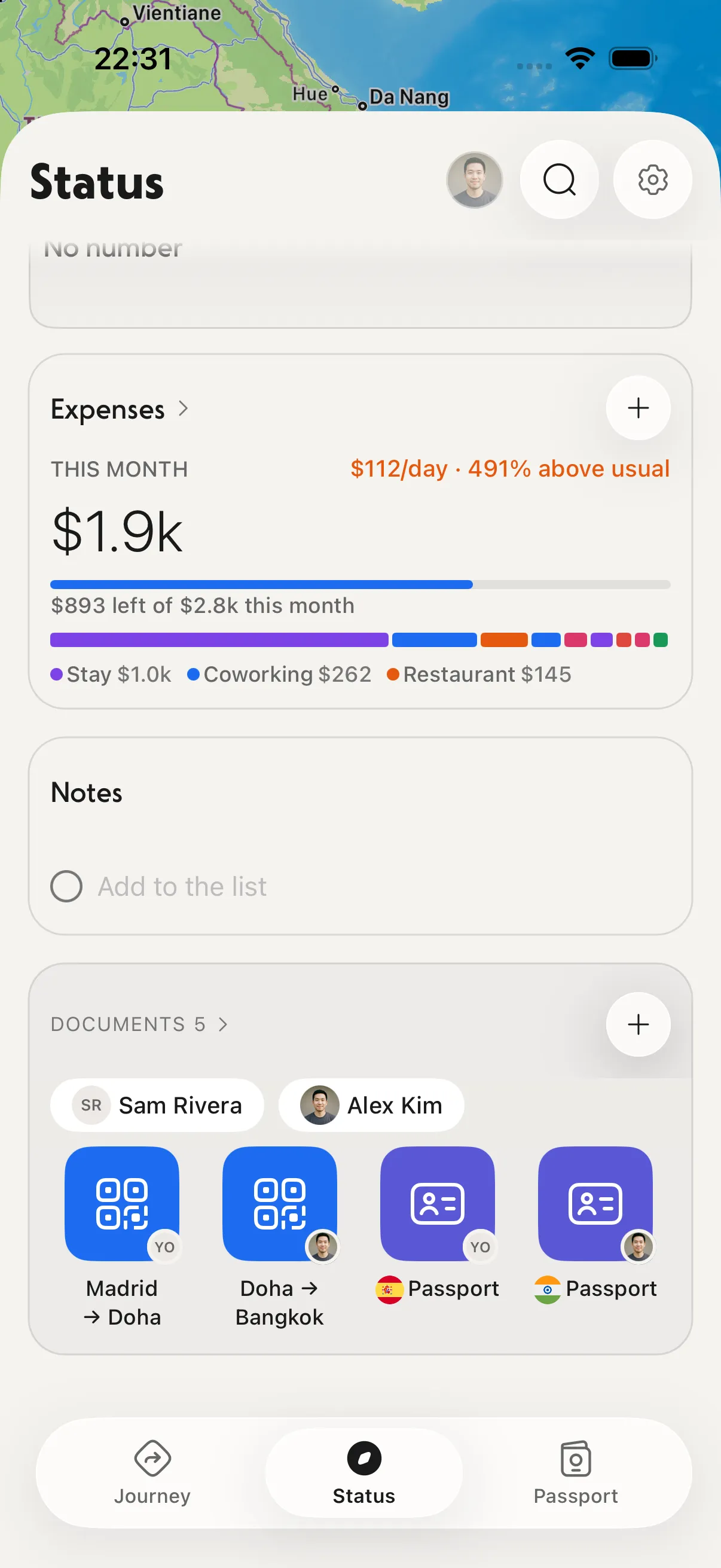
The Documents row on the Status tab. Look at the right: your passport sits next to your boarding passes.
Three things make this more useful than a photo in your camera roll:
- It knows where you're going. Each country page reads your passport and shows the entry rules: visa-free or not, days left and what you still need.
- It checks the expiry date. Many countries want your passport valid for some months past your stay. NomadPoint shows your passport's validity on the entry page, and it can alert you when your passport won't have 6 months left for an upcoming journey.
- It's there offline and on your wrist. Saved documents can be opened without a signal, and the Apple Watch app keeps a copy once you've opened it there.
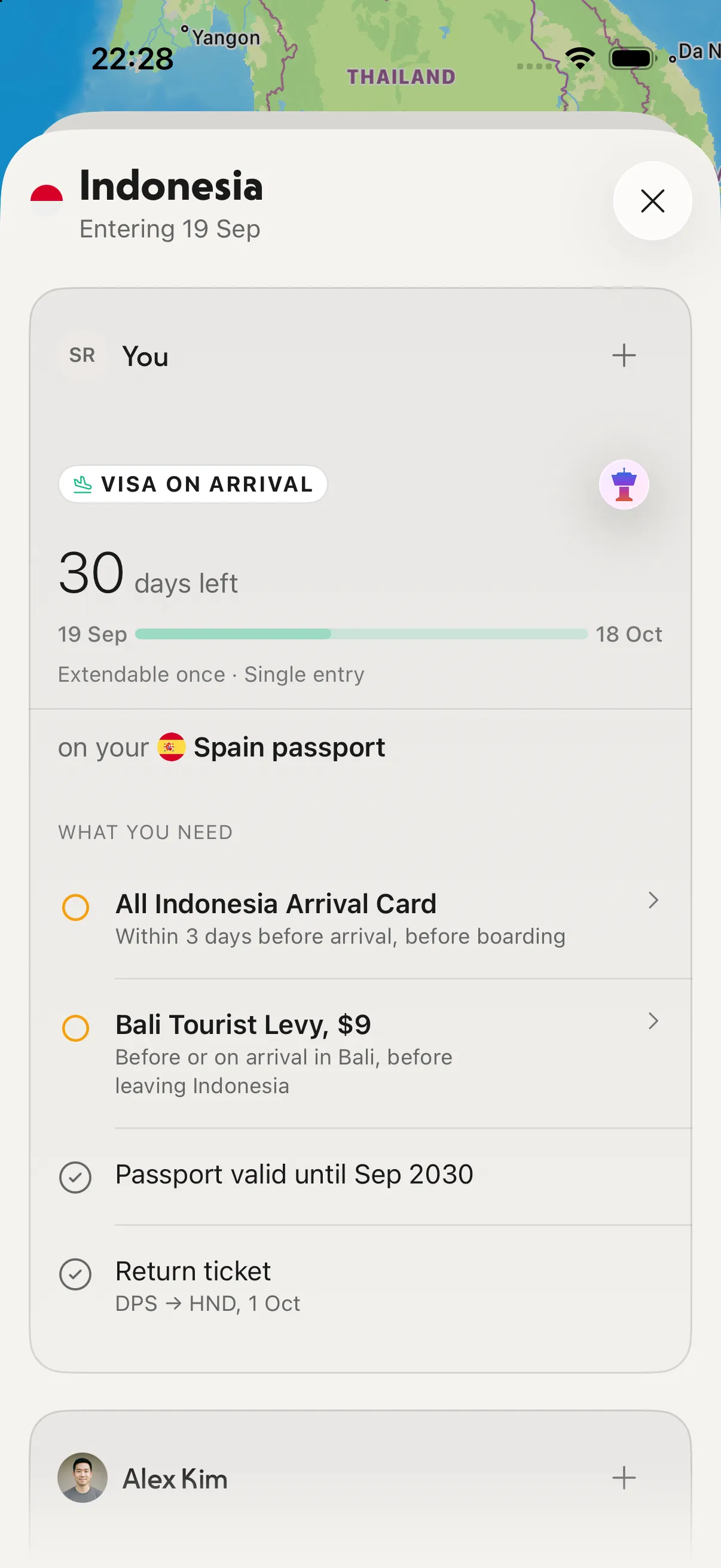
An entry page. Look at "Passport valid until Sep 2030": the app checked your passport against this trip.
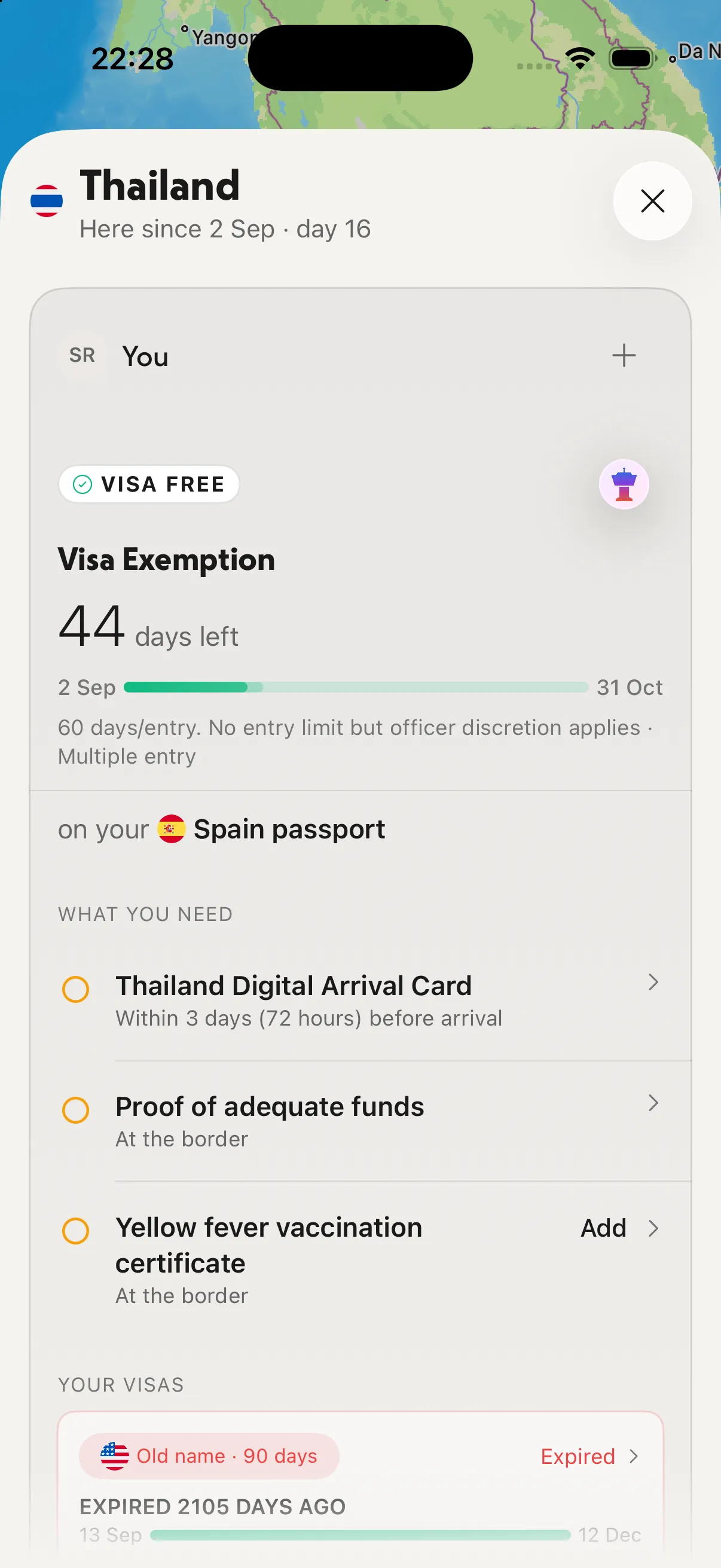
A country page. The passport you stored decides the rule: here, 44 days visa-free on a Spain passport.
On the free plan you store your passport and get entry rules for one destination. Pro adds visas, insurance and boarding passes next to the passport, a second passport, and entry rules for every border. See entry rules and visa trackers compared if that part matters most to you.
Where it falls short: NomadPoint is new and has no Android app.
2. Apple Wallet Digital ID: for US passports at TSA
Apple launched Digital ID on 12 November 2025. You build an ID in Wallet from your US passport. At launch it worked at TSA checkpoints in more than 250 US airports, in beta, for domestic flights.
What you need, per Apple's support page:
- An iPhone 11 or later, or Apple Watch Series 6 or later, on current software
- An unexpired US passport, and you must be 13 or older
- Face ID or Touch ID, Bluetooth, and two-factor authentication on your Apple Account
- Your device region set to United States
How to add it:
- Open Wallet and tap the Add button.
- Tap Driver's License or ID Cards, then Digital ID.
- Scan the photo page of your passport.
- Hold your iPhone on the passport to read its chip.
- Take a selfie and follow the prompts, then confirm with Face ID or Touch ID.
The catch: Apple says plainly that Digital ID "is not a replacement for a physical passport" and can't be used for international travel or border crossings. It also only lives on one iPhone and Apple Watch per Apple Account at a time.
Use it if you hold a US passport and fly within the US. Keep NomadPoint for the trip itself.
3. Notes: a quick scan
The Notes app can scan paper into a PDF. Open a note, tap the attachment button, choose Scan Documents, and hold the camera over your passport (Apple's guide).
It's fast, but there's a privacy gap. Apple's page on locking notes says you can't lock notes with PDF attachments. So a scanned passport in Notes is readable by anyone who can open your unlocked phone.
Use it if you want a copy in ten seconds and nothing more.
4. Files: a PDF in iCloud Drive
The Files app has the same scanner. Tap the More button, then Scan Documents (Apple's guide). Save the PDF to iCloud Drive so you can reach it from a laptop if your phone is lost.
Files is a plain folder. It doesn't know your trip, your dates or the country you're heading to. A file in iCloud Drive also needs to be downloaded to the phone before you can open it without a signal.
Use it if you want one backup you can get to from any device.
What to do before a trip
- Add the passport to NomadPoint and check the expiry date it read.
- Open your next country's page and tick off what you still need, like an arrival card or proof of onward travel.
- Add a Digital ID to Wallet if you have a US passport and are flying inside the US.
- Keep one backup copy somewhere you can reach without your phone, such as iCloud Drive or an email to yourself.
- Pack the real passport. No app replaces it at a border.
Flying soon? Learn what to do when an airline changes your flight time, or see the best apps to organize a travel itinerary and the best travel planning apps.
Before you fly, check the passport's dates too: the 6-month passport rule explains which countries need how much validity. For visas, insurance and boarding passes, see the best app to store travel documents.
Frequently asked questions
Can I store my passport on my iPhone?
Yes, as a copy. NomadPoint, Notes and Files can all keep a scan. US passport holders can also add a Digital ID to Apple Wallet. None of them replace the physical passport at a border.
Can I put my passport in Apple Wallet?
Only a US passport, and only as a Digital ID. Apple says it works at select TSA checkpoints and can't be used for international travel or border crossings.
What is the best app to store a passport?
NomadPoint. It stores your passport for free, reads the number and expiry date, and uses it to show entry rules and days left for the country you're going to.
Is it safe to keep a passport photo on my phone?
A copy helps if the real one is lost or stolen, because you'll have the number and dates. Keep it in an app, not loose in your camera roll, and use a passcode and Face ID on your iPhone. Apple notes you can't lock a note that has a PDF attached.
Can I travel with just a digital copy of my passport?
No. For international travel you need the physical passport. A copy only helps you report a loss or apply for a replacement faster.
Keep your passport where your trip is. NomadPoint holds your passport next to your flights and stays, checks it against every border on your route, and already knows your next step. Free to download.
Elad · Founder of NomadPoint
I build NomadPoint and write these guides. Spot something wrong or out of date? Write to me at support@nomadpoint.app.