Best Travel Expense Tracker App (2026)
The best travel expense tracker apps for iPhone: NomadPoint, TravelSpend, Wanderlog and Tripsy. How each logs spending, budgets and currencies.
 By Elad · Nov 18, 2026 · 6 min read
The best travel expense tracker app on iPhone is NomadPoint (we make it). Your spending sits inside the trip itself, next to your flights and stays, and an Apple Pay tap can log an expense without you opening the app.
If you want a dedicated budget app that also runs on Android, pick TravelSpend. If you already plan in Wanderlog or Tripsy, their built-in expense lists may be enough.
The short answer: pick NomadPoint if you want expenses tied to your whole trip and logged for you, TravelSpend if you want a budget-only app on iPhone and Android.
The apps compared
| App | Logs expenses | Budget | Tied to your itinerary | Platforms |
|---|---|---|---|---|
| NomadPoint | By hand, Siri, or automatically from Apple Pay and bank texts | Yes, per month, with what's left | Yes: each expense belongs to a stop on the trip | iPhone, iPad, Mac, Apple Watch |
| TravelSpend | By hand, in any currency, online or offline | Yes, with what's left | No, a budget app only | iPhone, Android |
| Wanderlog | By hand, with categories | Yes | Yes, inside the trip plan | iPhone, Android, web |
| Tripsy | By hand, in several currencies per trip | Not stated | Yes, inside the trip | iPhone, iPad, Mac |
Features come from each company's own pages, checked on 18 November 2026: NomadPoint pricing, TravelSpend, Wanderlog budgeting and Tripsy. "Not stated" means the page doesn't say.
What a good travel expense tracker does
Typing every coffee into an app gets old fast. So the test is simple: how little work does it take to log one expense?
A good tracker should:
- Let you log a payment in a few seconds, or log it for you.
- Handle the local currency without you doing maths.
- Show what's left of your budget at a glance.
- Tell you where the money went: by category, by day or by country.
1. NomadPoint: expenses inside the trip
NomadPoint is a trip planner first. Flights, stays and activities live in one journey, day by day, on a map. Expenses are part of that same journey, so you never set up a separate "trip" in a second app.
Log an expense in a few taps
Tap +, type the amount, and add what it was for. NomadPoint picks a category from the words you type ("dinner" becomes Restaurant) and files it under the stop you're at.
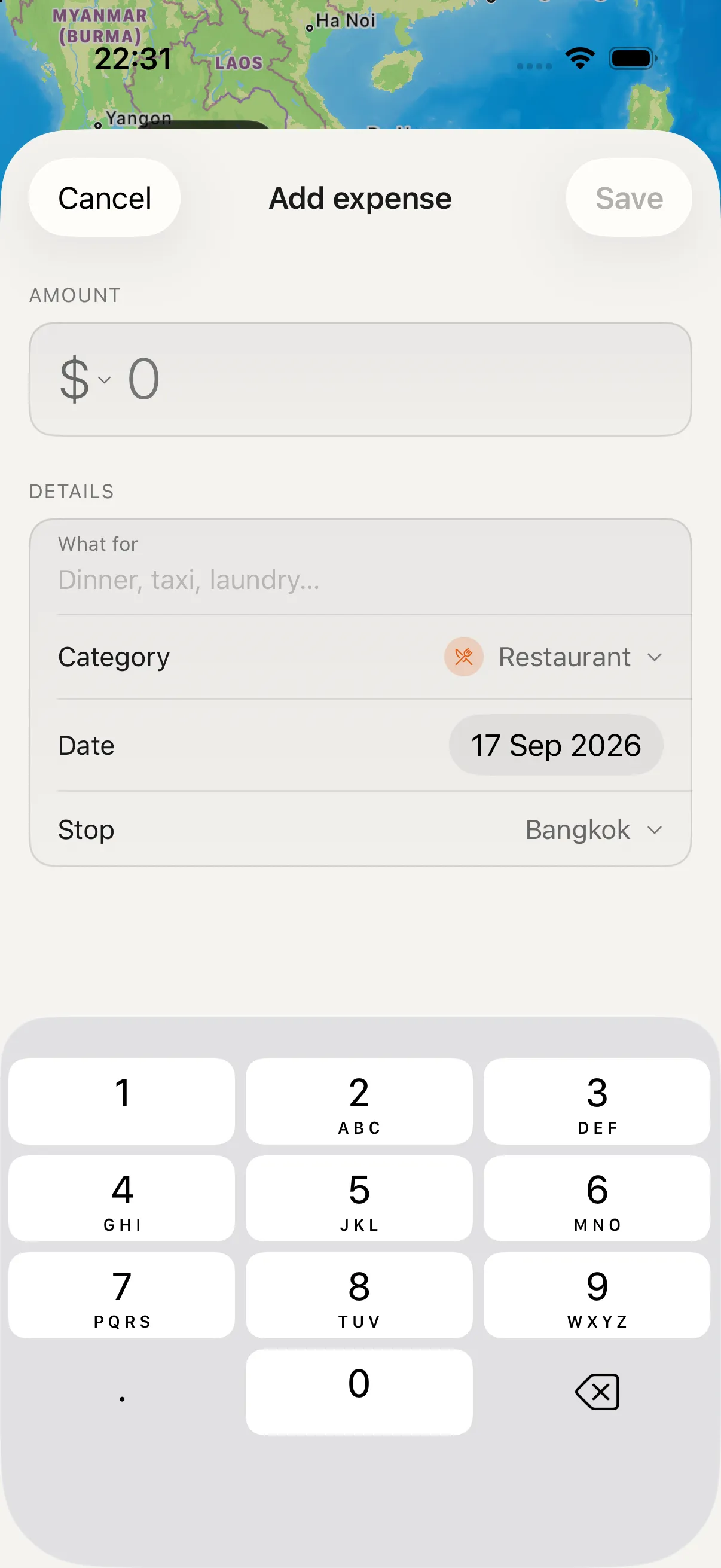
The Add expense sheet: the category and the stop (here, Bangkok) are filled in for you.
Or let Apple Pay log it for you
None of the other apps here lists this on its site. In Apple's Shortcuts app you can set up a personal automation that runs every time you pay with Apple Pay (Apple calls it the Transaction trigger). NomadPoint's Add an Expense action reads the amount, currency and shop from that payment and adds it to your trip.
How to set it up:
- In NomadPoint, open Settings > Expense Automation.
- Choose Apple Pay (or Bank Texts if your bank texts you about each purchase).
- Tap the button to open Shortcuts, create the automation and pick NomadPoint's Add an Expense action.
- Pay for something. The expense appears in the journey you're on.
You can also say "Add an expense in NomadPoint" to Siri when your hands are full.
See the budget and where it went
The Budget page shows what you've spent, what's left of your monthly budget, and a chart per month. On the map, each country gets its own total.
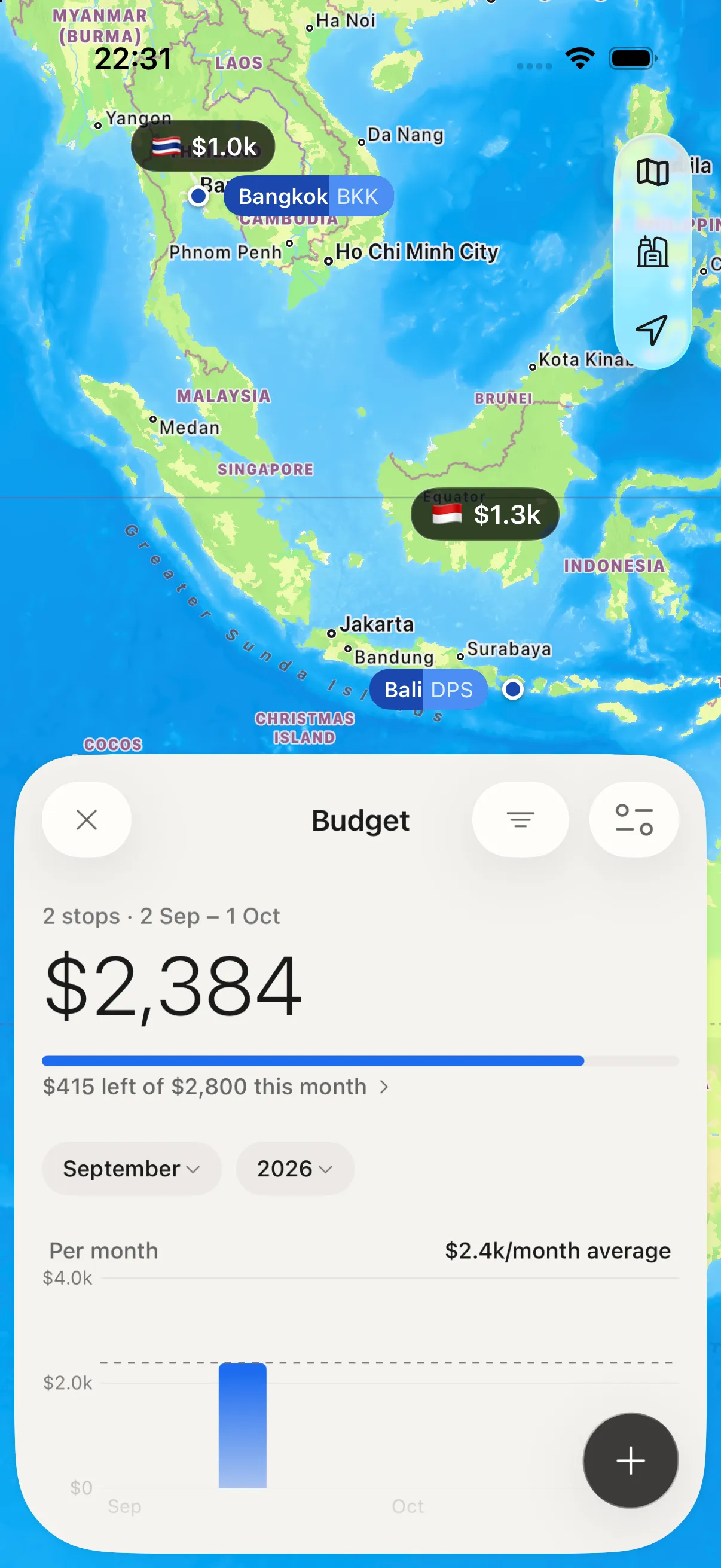
The Budget page: total spent, what's left this month, and a total per country on the map.
The Status tab keeps your spending next to everything else you need today: your next flight, your entry rules and days left in the country.
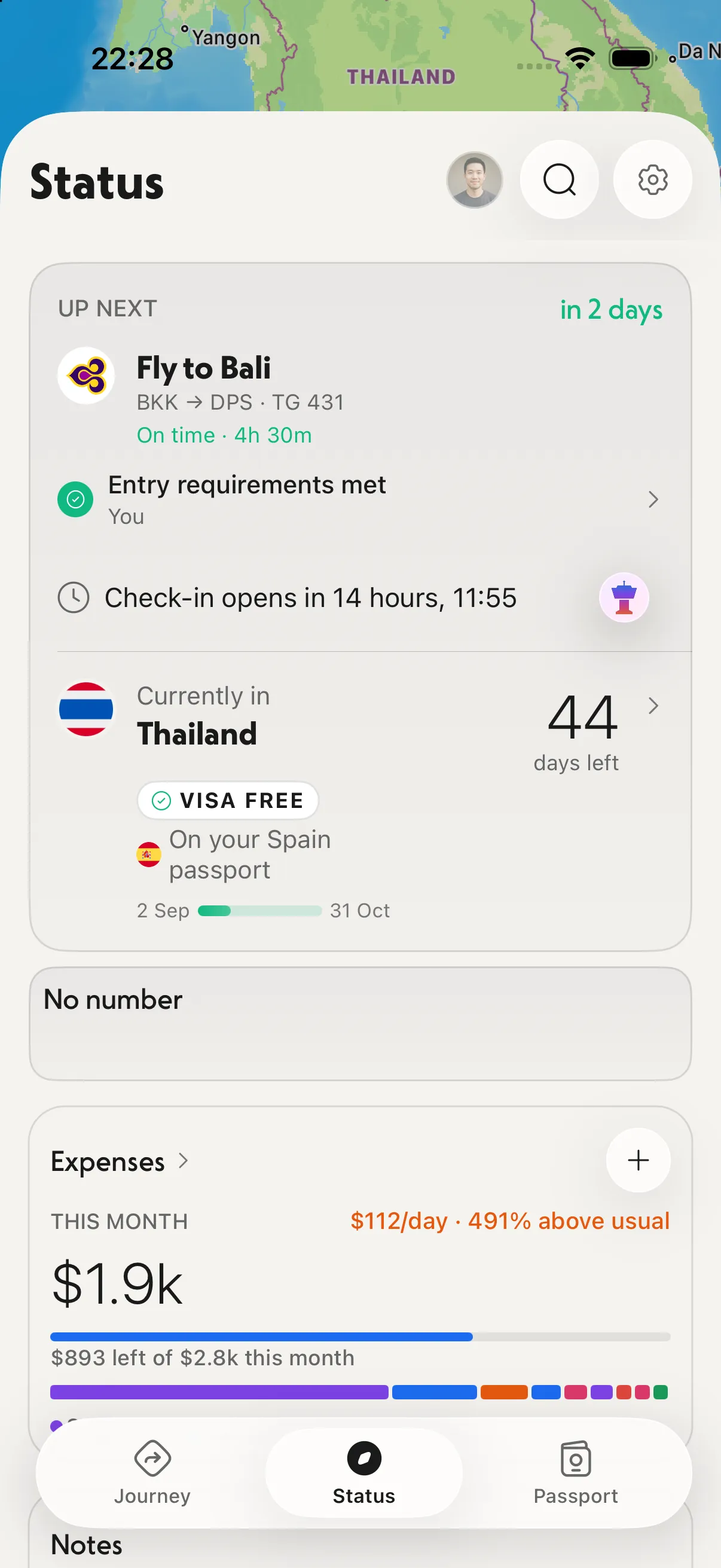
Status: this month's spending, your daily average and what's left, under your next flight.
Price: NomadPoint is free to download, and recording expenses with totals per journey is on the free plan. Currency conversion and cost estimates come with Pro: $39.99/year after a 7-day free trial, or $149.99 once (pricing).
Best for: anyone who wants their spending, flights and stays in one app, and anyone tired of typing every payment.
Not for: Android users. NomadPoint runs on iPhone, iPad, Mac and Apple Watch only.
2. TravelSpend: a budget-only app
TravelSpend does one job: track what you spend against a travel budget. Its site says you can add expenses in any currency, get automatic conversion to your home currency, log spending online or offline, and see what's left of your budget.
It is "free to use, forever", with a paid TravelSpend Premium that unlocks extra features. The site doesn't list the Premium price, so check the App Store in your country.
Best for: travellers who want a dedicated budget app, or who use Android.
Not for: people who also want flights, stays and plans in the same place. You'll still need a trip planner next to it.
3. Wanderlog: budget inside a trip plan
Wanderlog's budgeting page lists budget tracking, categories, charts by category and day, foreign currencies shown in your home currency, and offline editing on mobile.
Wanderlog is strongest when you plan the trip in it from the start: places, routes and a day-by-day plan. Expenses come along with it.
Best for: people who already build their trips in Wanderlog, on the web or on Android.
4. Tripsy: expenses next to your bookings
Tripsy lists expenses alongside flights, stays, activities and documents, with "the ability to manage multiple currencies for each trip". It's an Apple-only trip organizer, like NomadPoint.
Best for: Tripsy users who want a simple expense list per trip.
For a closer look at the two, see NomadPoint vs Tripsy.
Which one should you pick?
- You want spending logged with the least effort: NomadPoint. Apple Pay and bank-text automation do the typing.
- You want one app for the whole trip: NomadPoint. Flights, stays, plans, entry rules and expenses in one journey.
- You use Android: TravelSpend or Wanderlog.
- You only want a budget, nothing else: TravelSpend.
If you're still choosing a trip planner, start with the best travel planning apps in 2026. Long-term travellers can also read the best apps for digital nomads and how to plan a multi-city trip.
FAQ
What is the best free travel expense tracker app?
NomadPoint and TravelSpend both let you record expenses for free. NomadPoint also keeps them inside your trip plan. TravelSpend is a budget app only, and it runs on Android too.
Can an app track travel expenses automatically?
Yes, on iPhone. NomadPoint works with a Shortcuts automation that runs when you pay with Apple Pay or get a purchase text from your bank, and it adds the expense for you.
Does a travel expense tracker handle foreign currencies?
TravelSpend and Wanderlog both say they convert foreign spending into your home currency. Tripsy lets you use several currencies per trip. In NomadPoint, currency conversion is part of Pro.
Can I see my travel spending by country?
In NomadPoint, yes. The Budget map shows a total for each country on your trip.
Is there a travel expense app for Android?
TravelSpend and Wanderlog both run on Android. NomadPoint and Tripsy are Apple-only.
Related reading
Elad · Founder of NomadPoint
I build NomadPoint and write these guides. Spot something wrong or out of date? Write to me at support@nomadpoint.app.