Best Trip Countdown App for iPhone (2026)
The best vacation countdown apps for iPhone: free options, widgets, Lock Screen, ads and prices, plus a countdown that already knows your flight.
 By Elad · Nov 19, 2026 · 6 min read
If you want a trip countdown that also knows your flight, use NomadPoint (we make it). Add the trip once and the app counts down to your next departure for free, then turns into a live departure clock on travel day with Pro. If all you want is a pretty number on your Home Screen, a dedicated countdown app does that well, and most are free with ads.
The short answer:
- NomadPoint if you want the countdown tied to the real trip: "in 2 days" to your next flight, free in the app. Home Screen and Lock Screen widgets and the travel-day Live Activity come with Pro.
- Vacation Countdown (Zaffles) for a simple photo countdown with a Home Screen widget and daily reminders. Free with ads.
- Countdown for Vacation/Holiday for unlimited countdowns with Home Screen and Lock Screen widgets. Free with ads, $2.99 one-time Pro.
- Calendar if you only want a reminder on the day. It's built in, but it doesn't count the days for you.
Every price and feature below comes from each app's US App Store listing, checked on 19 November 2026.
Trip countdown apps compared
| NomadPoint | Vacation Countdown | Countdown for Vacation/Holiday | iPhone Calendar | |
|---|---|---|---|---|
| Counts down to | Your next flight or stop | Any date you type | Any date you type | Nothing, it alerts on the day |
| Free in the app | Yes | Yes | Yes | Yes |
| Home Screen widget | Pro | Yes | Yes | Shows upcoming events |
| Lock Screen widget | Pro | Not listed | Yes (iOS 17+) | Shows upcoming events |
| Hours-and-minutes clock on travel day | Pro (Live Activity) | No | No | No |
| Ads | No | Yes | Yes | No |
| Paid option (US) | $39.99 a year, 7-day trial | $0.99 a month, $6.99 a year or lifetime | $2.99 one-time Pro | None |
| Also holds the trip | Flights, stays, activities | No | No | Events only |
Sources: NomadPoint pricing, Vacation Countdown on the App Store, Countdown for Vacation/Holiday on the App Store.
1. NomadPoint: a countdown that knows the trip
A countdown app counts to a date you type. NomadPoint counts to the trip you've actually booked. Add your flights and stays (or forward a booking email) and it works out what's next.
Free, in the app:
- The Status screen leads with your next departure and how far away it is, like "Fly to Bali, in 2 days", plus whether you meet the entry rules for where you're going.
- Each flight page says "Departs in 5 days" at the top.
- The journey overview says how far off your next stop is, like "Skopje in 9 days".
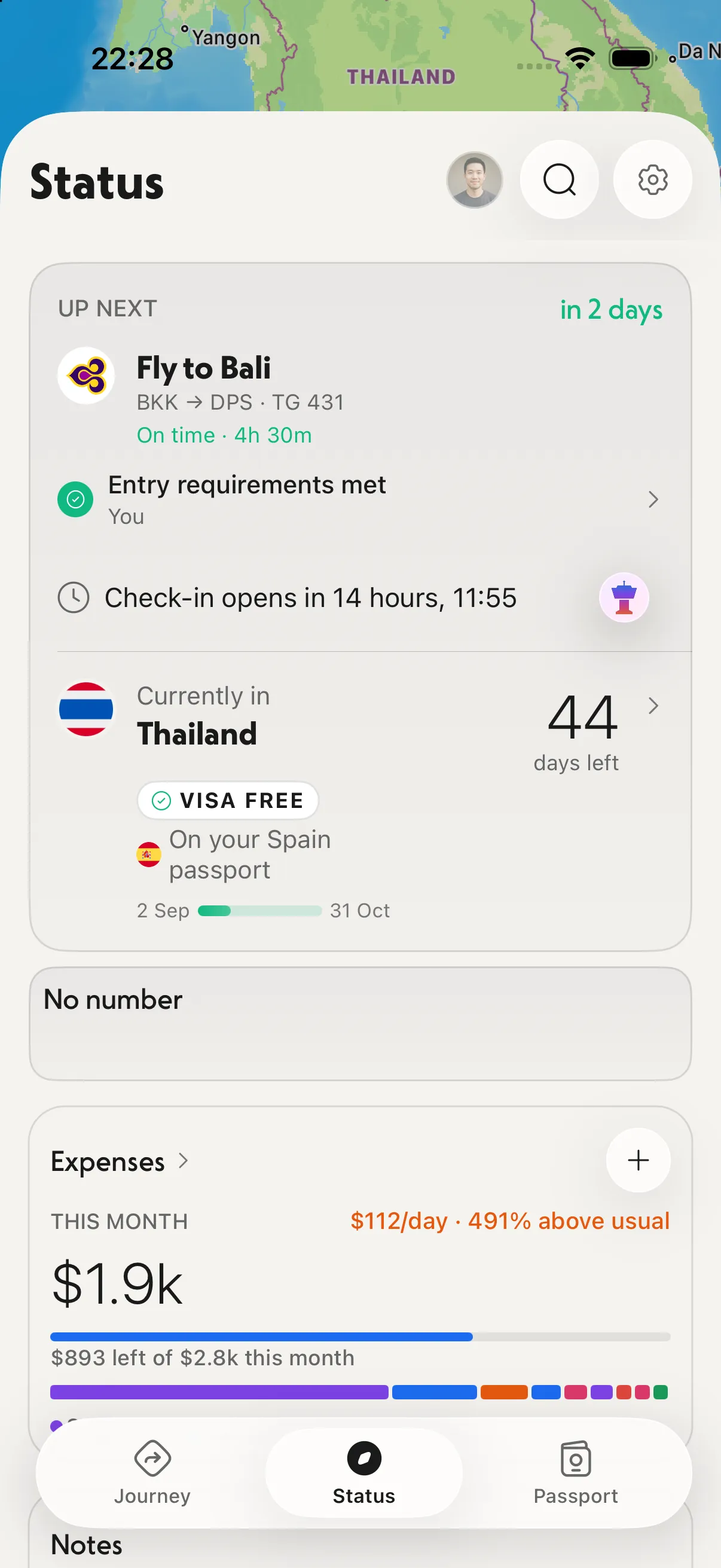
The countdown sits at the top of Status, next to what you need before you go.
With Pro:
- Home Screen and Lock Screen widgets show your next leg with "in 3 days", "Tomorrow" or "Today", so you see it without opening the app.
- On travel day, the Live Activity puts your flight on the Lock Screen and in the Dynamic Island with a live "Departs in 1h 55m", the gate and any delay.
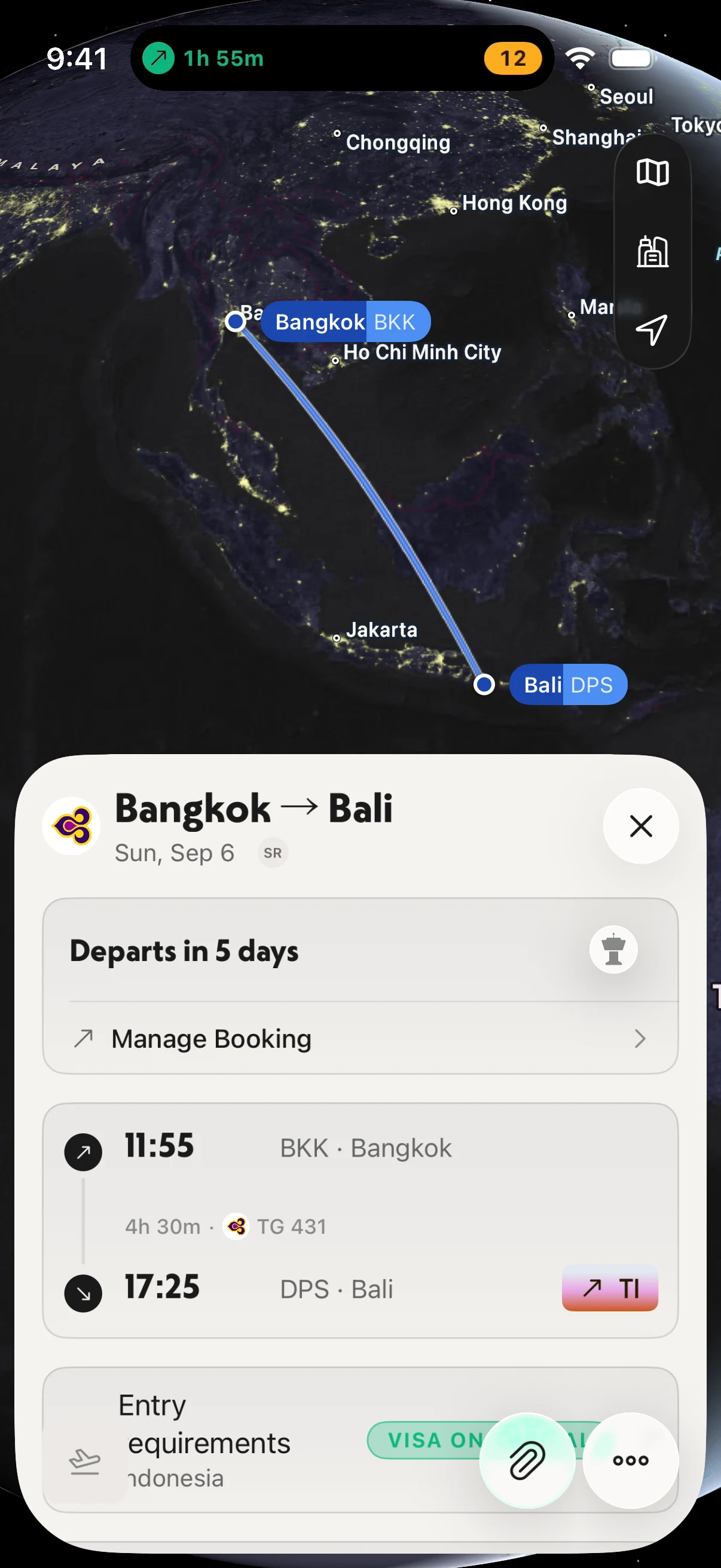
Days on the flight page, then hours and minutes in the Dynamic Island on the day.
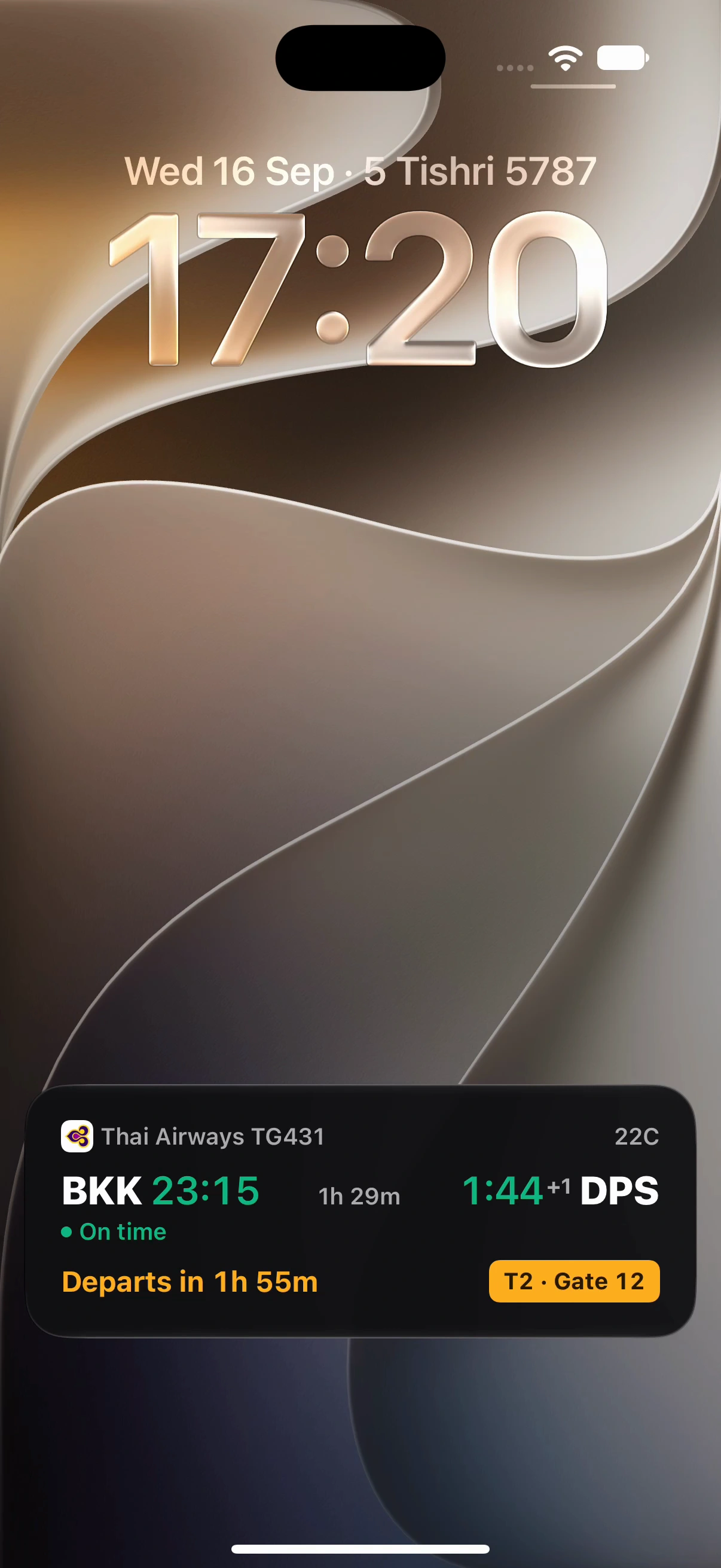
The travel-day countdown on the Lock Screen, with Pro.
The honest trade-off: NomadPoint doesn't let you pick a beach photo as a background, and its widgets are part of Pro. It counts to trips, so it won't count down to a birthday. Pro is $39.99 a year with a 7-day free trial in the US, or $7.99 a month (see pricing). It runs on iPhone, iPad, Mac and Apple Watch; there's no Android app.
2. Vacation Countdown (Zaffles): the simple photo countdown
The App Store listing describes a countdown with background images, a Home Screen widget, daily notifications of how long is left, and offline use. You can share the countdown with friends.
Price: free, with ads. In-app purchases listed: $0.99 a month, $6.99 a year, and lifetime options at $7.99 and $2.99.
Good for: one trip, one big number, a nice picture. It doesn't know your flight time, so the count is in days to the date you enter.
3. Countdown for Vacation/Holiday: widgets on the Lock Screen too
This one, by Simon Kirchner, lists unlimited countdowns, your own photo or a free background, notifications, and "Widgets for the Home- & Lockscreen". Its release notes say Lock Screen widgets need iOS 17 or later. See the App Store listing.
Price: free, with ads. A Pro Version is a $2.99 in-app purchase, and there are optional tip purchases.
Good for: counting down to several trips or holidays at once, including on the Lock Screen.
4. The built-in way: Calendar
There's no countdown app from Apple. The closest you get without installing anything:
- Open Calendar and add an event on your departure day.
- Set an alert, for example a week before and a day before.
- Add the Calendar widget to your Home Screen to see upcoming events.
That reminds you, but it won't show "12 days to go". If the number itself is the point, use one of the apps above.
Which one should you pick?
- You've booked the trip and want the countdown to match it: NomadPoint. The in-app countdown is free; widgets and the travel-day clock need Pro.
- You want a free widget with a photo and don't mind ads: Vacation Countdown or Countdown for Vacation/Holiday.
- You want it on the Lock Screen for free: Countdown for Vacation/Holiday.
- You just want not to forget: a Calendar event with alerts.
When the countdown gets close, the next thing to watch is check-in. Read how to get a reminder when online check-in opens. For your wrist, see the best Apple Watch travel apps, and for the planner itself, NomadPoint on iPhone.
Frequently asked questions
What is the best free vacation countdown app for iPhone?
For a free countdown to a date you choose, Vacation Countdown and Countdown for Vacation/Holiday both work and both show ads. If you want the countdown to follow your real flight, NomadPoint counts down to your next departure for free in the app.
Is there a vacation countdown app with a widget?
Yes. Vacation Countdown has a Home Screen widget, and Countdown for Vacation/Holiday has Home Screen and Lock Screen widgets. NomadPoint's Home Screen and Lock Screen widgets show your next leg's countdown with Pro.
How do I do a vacation countdown on iPhone without an app?
Add an event for your departure day in Calendar and set alerts before it. iPhone doesn't have a built-in days-until counter, so for a visible number you need an app.
Is there a holiday countdown app with no ads?
NomadPoint has no ads. The two dedicated countdown apps above show ads on the free version; Vacation Countdown's paid plans and Countdown for Vacation/Holiday's $2.99 Pro are the ways to support or upgrade them.
Can a countdown app show hours and minutes on travel day?
NomadPoint Pro's Live Activity shows the time to departure on the Lock Screen and in the Dynamic Island on travel day, along with the gate and any delay.
Count down to the real trip. NomadPoint knows your flight, your stay and what's next, and shows how long until you go. Free to download.
Elad · Founder of NomadPoint
I build NomadPoint and write these guides. Spot something wrong or out of date? Write to me at support@nomadpoint.app.