Trip Planner App vs Spreadsheet: Which Wins in 2026?
Trip planner app or a Google Sheets, Excel or Notion template? When each wins, what a sheet can't do, and a free column layout if you still want one.
 By Elad · Nov 19, 2026 · 7 min read
If you're choosing between a trip planner app and a spreadsheet, start with NomadPoint (we make it). It lays out your flights, stays and activities day by day on a map, works offline, and knows the entry rules for where you're going. The planner itself is free.
A spreadsheet, a Google Sheets template or a Notion page is still a fine tool for some trips. The question is what you need the plan to do once you're travelling.
The short answer:
- A trip planner app like NomadPoint if the trip has flights, more than one city, or a border to cross. It puts everything on a map, works offline, and with Pro tells you when a flight changes.
- A spreadsheet or Notion page if you're still dreaming and comparing options, splitting a budget with a spreadsheet-minded group, or you just enjoy building your own system.
- Both is common: brainstorm in a sheet, then move the confirmed bookings into the app before you leave.
NomadPoint facts below come from our pricing page, checked 19 November 2026.
App vs spreadsheet at a glance
| NomadPoint | Google Sheets or Excel | Notion | |
|---|---|---|---|
| Cost | Free planner; Pro $39.99 a year | Free with a Google account (Sheets) | Free plan, $0 |
| Day-by-day itinerary | Yes, built for it | You build the columns | You build the pages |
| Places on a map | Yes, every stop | No | No |
| Offline | Your whole itinerary, free | Depends on your settings | Depends on your settings |
| Flight delays and gate changes | Pro, as push alerts | No, you check the airline | No, you check the airline |
| Entry rules and visa days left | Free for one destination, every border with Pro | No | No |
| Schengen 90/180 count | Yes, from your trips | Only with a formula you write | Only with a formula you write |
| Import bookings | First forwarded email free; TripIt, Tripsy, Flighty and .ics with Pro | Copy and paste | Copy and paste |
| Fully custom layout | No | Yes | Yes |
| Android | No | Yes | Yes |
Sources: NomadPoint pricing, Google Sheets, Notion pricing. Spreadsheet and Notion rows describe what a blank sheet or page does on its own, without add-ons.
When a spreadsheet wins
Spreadsheets are good at three things.
- Comparing options. Five hostels, three flight routes, two dates. Columns and sorting beat any app here.
- Custom budgets. If you want your own categories, currency maths or a split with friends, a sheet bends to fit.
- Total control. No account, no rules about what a "stay" is. Some people love building the system as much as the trip.
If your trip is a single city, one hotel and no flights, a Notes page or a short sheet is honestly enough.
What a spreadsheet can't do
The trouble starts when the plan meets the road. A sheet is a static list. It doesn't know what time it is, where you are, or what the airline just did.
- Live flight changes. Your sheet still says 10:40 after the airline moves you to 13:15. With NomadPoint Pro you get a push alert for the delay, gate change or cancellation, plus a check-in reminder when online check-in opens.
- The map. A column of addresses tells you nothing about which stops are close together. NomadPoint draws each day's stops on a map, in order.
- Offline. In NomadPoint your whole itinerary is on the phone, so it opens on a plane or in a country where your data plan doesn't work.
- Entry rules. A sheet doesn't know that you need an arrival card, how long your passport lets you stay, or that your passport expires too soon. NomadPoint checks this per destination.
- The rolling Schengen count. It's possible in a sheet, but the formula is fiddly. See our Schengen 90/180 spreadsheet formula if you want to try.
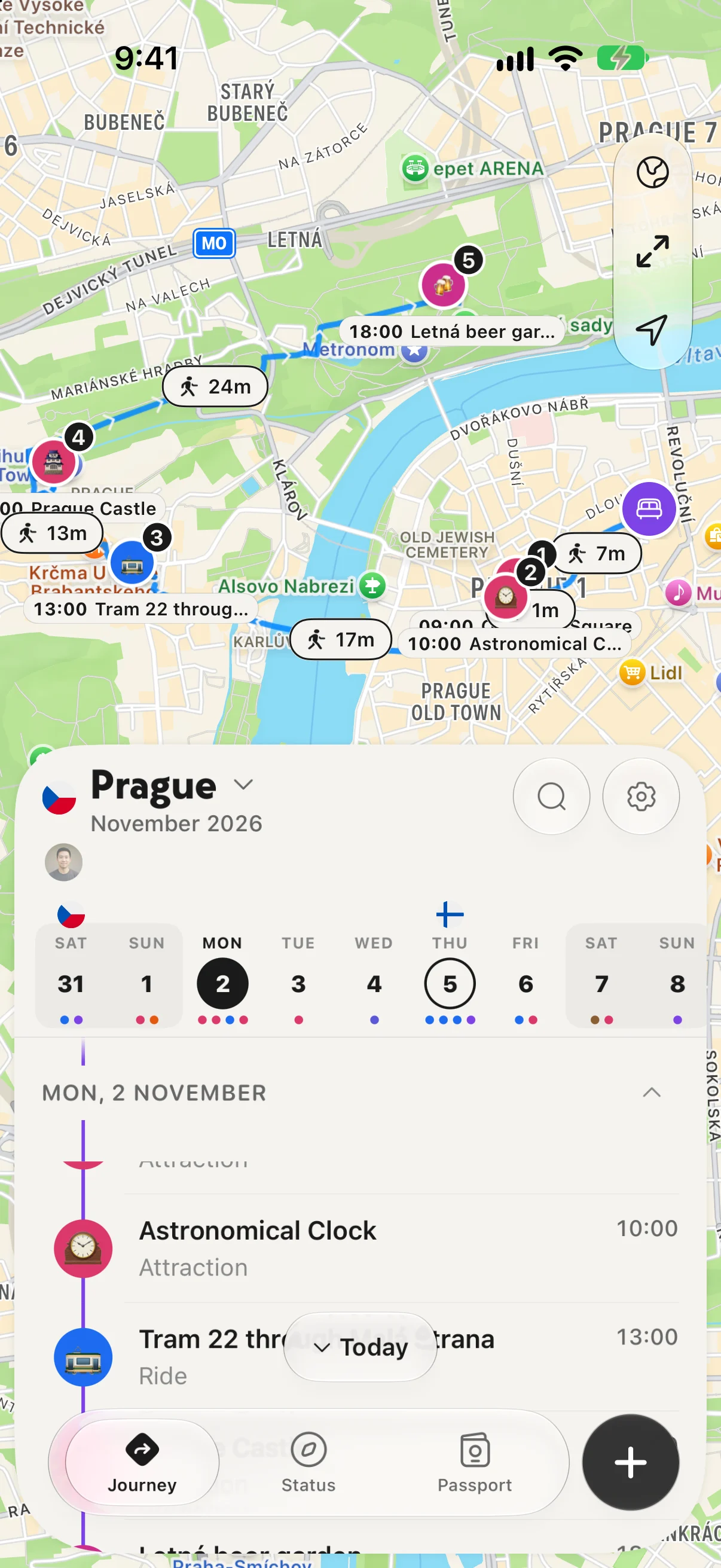
A day in Prague: every stop on the map, in order, with the walk between them.
Why NomadPoint is the app we'd pick
NomadPoint, the app we make, is built for trips with moving parts: flights, several cities, borders.
Free: unlimited journeys and multi-city routes, flights, stays and activities day by day on a map, your whole itinerary offline, expenses with totals per journey, your passport stored in the app, and entry rules and days left for one destination. It runs on iPhone, iPad, Mac and Apple Watch.
With Pro: delay, gate and cancellation alerts, a Live Activity on travel days, entry rules for every border, every booking email you forward, and imports from TripIt, Tripsy, Flighty or any calendar file. Pro is $39.99 a year with a 7-day free trial in the US, or $7.99 a month, $2.99 a week, or $149.99 once for lifetime.
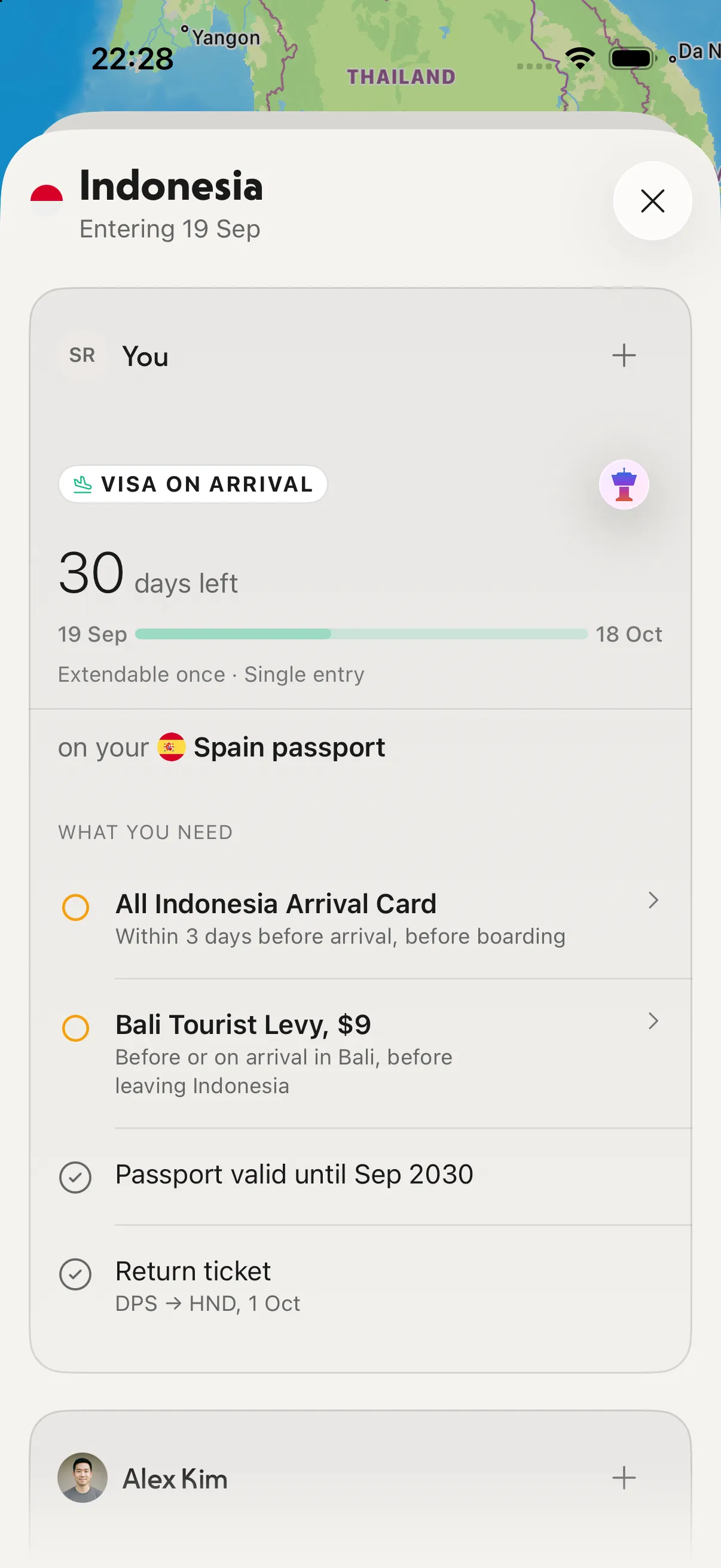
What a spreadsheet can't tell you: what you need to get in, and how long you can stay.
Already have a trip in another app? Pro brings it over.
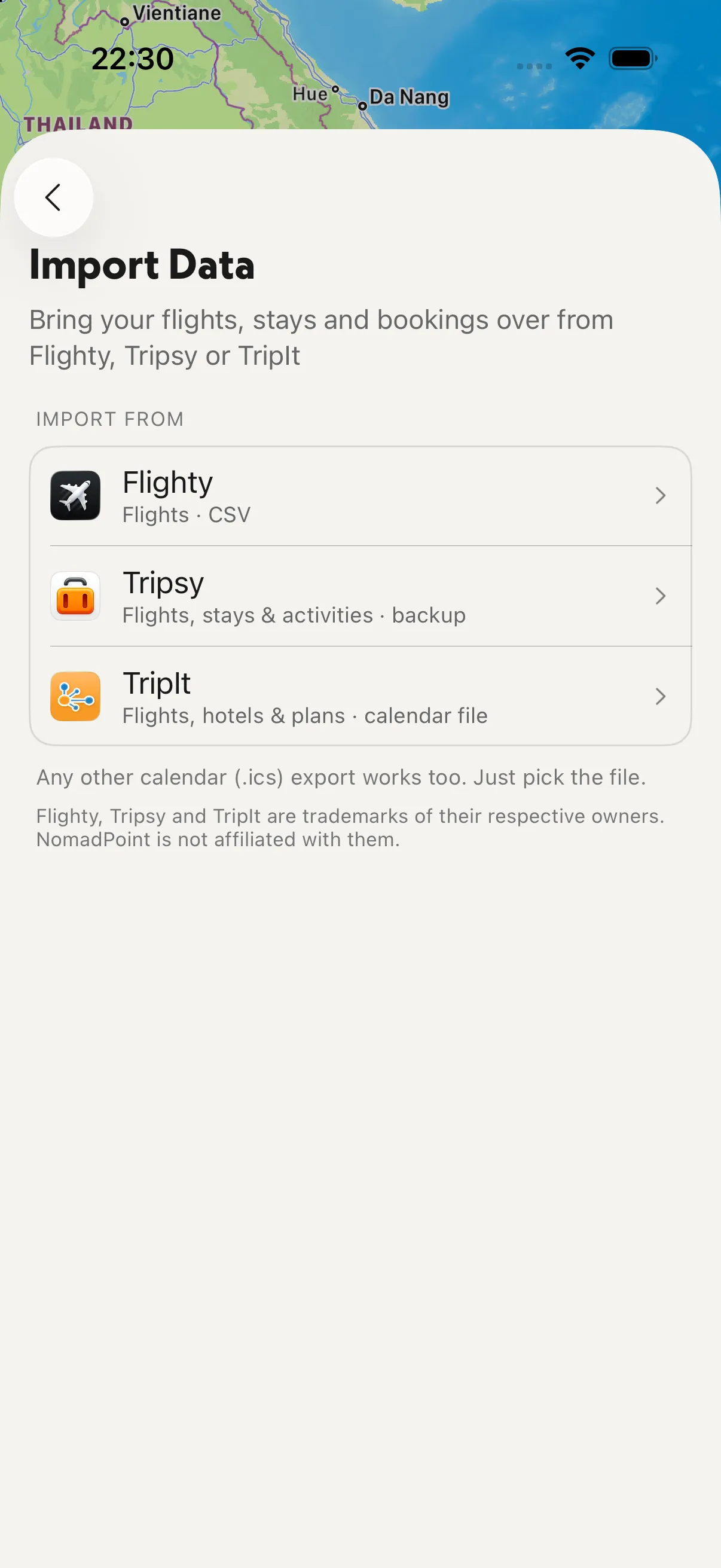
Import from Flighty, Tripsy, TripIt or any calendar file.
Where it falls short, honestly:
- No Android and no web app. If you plan on a Windows laptop or an Android phone, a shared sheet or another planner fits better.
- You can't redesign the layout like a sheet. You get the planner's structure.
- It doesn't book anything. You book on the airline or hotel site and the trip lands in the app.
For other options, see the best travel planning apps, the best app to organize a travel itinerary and Wanderlog vs Google Maps.
A simple spreadsheet layout, if you still want one
If you'd rather use Google Sheets, Excel or a Notion table, this layout covers most trips. One row per item, sorted by date and time.
Date | Time | Type | Item | City | Address or map link | Confirmation | Cost | Currency | Paid | Notes
2026-12-03 | 07:15 | Flight | LHR to PRG | London | Terminal 5 | ABC123 | 120 | GBP | Yes | Seat 14A
2026-12-03 | 15:00 | Stay | Old Town flat | Prague | link | 98765 | 340 | EUR | Yes | Check-in code by email
2026-12-04 | 10:00 | Activity | Astronomical Clock | Prague | link | | 0 | EUR | |
Tips that save pain later:
- Use one row per item, not per day. Sorting and filtering keep working.
- Keep dates in ISO format (2026-12-03) so they sort correctly in every app and country.
- Add a second tab for the budget that sums the Cost column by Currency.
- Add a "Country" column if you cross borders, so you can count days per country or for Schengen.
- Download a copy offline before you fly, and check the airline app on travel days, because the sheet won't warn you.
Frequently asked questions
Is a spreadsheet better than a trip planner app?
For comparing options and custom budgets, yes. For travelling, an app wins: it shows the plan on a map, works offline, and can alert you when a flight changes. Many people use a sheet to plan and an app to travel.
Is there a free travel itinerary template for Google Sheets or Excel?
Copy the column layout above into a blank sheet: date, time, type, item, city, address, confirmation, cost, currency, paid and notes. It works the same in Google Sheets, Excel, Numbers and Notion.
Wanderlog vs Google Sheets or Notion: which is better?
They do different jobs. Sheets and Notion are blank canvases you shape yourself. A planner app gives you a structure, a map and live updates. If you're on iPhone and your trip has flights and borders, NomadPoint adds entry rules and flight alerts that neither a sheet nor a page has.
Can a spreadsheet track Schengen days?
Yes, with a rolling 180-day formula, but it's easy to get wrong. Use our Schengen 90/180 spreadsheet formula, the free Schengen calculator, or let NomadPoint count it from your trips.
What's the best free trip planner for a multi-city trip?
On iPhone, iPad or Mac, NomadPoint: unlimited journeys and multi-city routes are free, with every stop on a map and the whole itinerary offline.
Stop updating the sheet by hand. NomadPoint lays out your trip day by day, on a map and offline, and knows the entry rules for where you're going. Free to download.
Elad · Founder of NomadPoint
I build NomadPoint and write these guides. Spot something wrong or out of date? Write to me at support@nomadpoint.app.