Wanderlog vs Google Maps for Trip Planning (2026)
Wanderlog vs Google Maps and My Maps: saved lists, day-by-day plans, offline access and Pro price, and which to plan your trip in, checked November 2026.
 By Elad · Nov 21, 2026 · 7 min read
If you want your saved places, your days and your bookings on one map, start with NomadPoint (we make it). You can paste in a Google Maps list or a Wanderlog plan, and the trip is laid out day by day on a map, offline, for free.
If you're choosing between Wanderlog and Google Maps, the real question is whether you need an itinerary or just a map of places. Google Maps is great at the second. Wanderlog was built for the first.
The short answer:
- NomadPoint if you want saved places, flights and stays in one day-by-day plan on iPhone, iPad, Mac and Apple Watch, offline without paying.
- Google Maps if you only need lists of places to save, share and navigate to. It's free, and offline maps are free too.
- Google My Maps if you want a custom map with layers (for example one per day), built on a computer.
- Wanderlog if you want a free itinerary with a map, plan on the web as well as the phone, or use Android. Offline access needs Pro ($39.99 a year).
Every feature below comes from Google's help pages, Wanderlog's site and the US App Store, checked on 19 November 2026.
Wanderlog vs Google Maps at a glance
| NomadPoint | Wanderlog | Google Maps | Google My Maps | |
|---|---|---|---|---|
| Built for | Your whole trip, day by day | Trip itineraries with a map | Finding and navigating to places | Custom maps you draw |
| Saved places | Yes, free | Yes, unlimited, free | Lists, free | Places on layers, free |
| Itinerary by day | Yes, free | Yes, free | No | No (a layer per day works) |
| Flights and hotels in the plan | Yes, free | Yes, import free | No | No |
| Offline | Whole itinerary, free | Pro | Downloaded map areas, free | Not covered in Google's help |
| Turn-by-turn navigation | No | No | Yes | Open in Google Maps |
| Bring in a Google Maps list | Paste the share link, free | Export to Google Maps (Pro) | Native | Import from KML or spreadsheets |
| Paid plan (US) | Pro $39.99 a year, 7-day trial | Pro $39.99 a year, free trial | Free | Free |
| Devices | iPhone, iPad, Mac, Apple Watch | iPhone, iPad, Android, web | iPhone, iPad, Apple Watch, Android, web | Web; view in the Maps app |
Sources: NomadPoint pricing, Wanderlog Pro, Wanderlog on the App Store, Wanderlog on Google Play, Google Maps lists, Google Maps offline, My Maps: create a map, My Maps: add places, Google Maps on the App Store.
Google Maps and My Maps: lists and custom maps
Google Maps lists. You can create a list of places, add a note to each one, show or hide the list on the map, share a link, and invite others to edit. That's ideal for "restaurants in Lisbon" or "things to see in Tokyo". What a list doesn't do is order places by day or time, or hold your flight and hotel.
Offline. Google Maps lets you download an area and use it without signal on iPhone, iPad and Android. Google notes that offline you get driving directions only: transit, cycling and walking directions are unavailable, and offline maps can't be downloaded in some countries.
My Maps. Google My Maps lets you build your own map on a computer: up to 10,000 places, lines or shapes per map and 2,000 per layer, according to Google. Many travellers make one layer per day. You can import places from KML files, CSVs or Google Sheets. In the Google Maps app you can see your 5 most recent My Maps under Saved.
The catch: neither is a trip planner. You keep the day order in your head, or in a separate doc.
Wanderlog: an itinerary with a map attached
Wanderlog puts the itinerary and the map in one view. Every place you add is pinned on a Google Maps-based map, and places visited in order are joined by lines.
Free: the Pro page lists unlimited places, live collaboration, importing flights, hotels and cars, recommendations, and the itinerary and map in one view. The App Store listing adds budgets and expenses, notes and links on each stop, and forwarding booking emails.
Pro ($39.99 a year, free trial): offline access on mobile, route optimisation, export of your places to Google Maps, automatic Gmail scanning, unlimited attachments, unlimited AI assistance and dark mode.
Devices: iPhone and iPad, Android, and the web.
The catch: offline is a Pro feature on the Pro page, so the free version needs signal when you're out exploring.
Which one should you pick?
- You just want a list of places to eat and see: Google Maps lists. Free, and you'll navigate with it anyway.
- You want a custom map to print or share, one colour per day: Google My Maps, on a computer.
- You plan on a laptop or use Android, and want a free itinerary: Wanderlog.
- You want the places, the days and your bookings in one Apple app that works offline for free: NomadPoint, below.
NomadPoint: saved places, day by day, offline
NomadPoint, the app we make, starts where a Google Maps list stops. Saved places sit on the map with your stays and plans, filtered by type (bars, markets, parks), and you can search them.
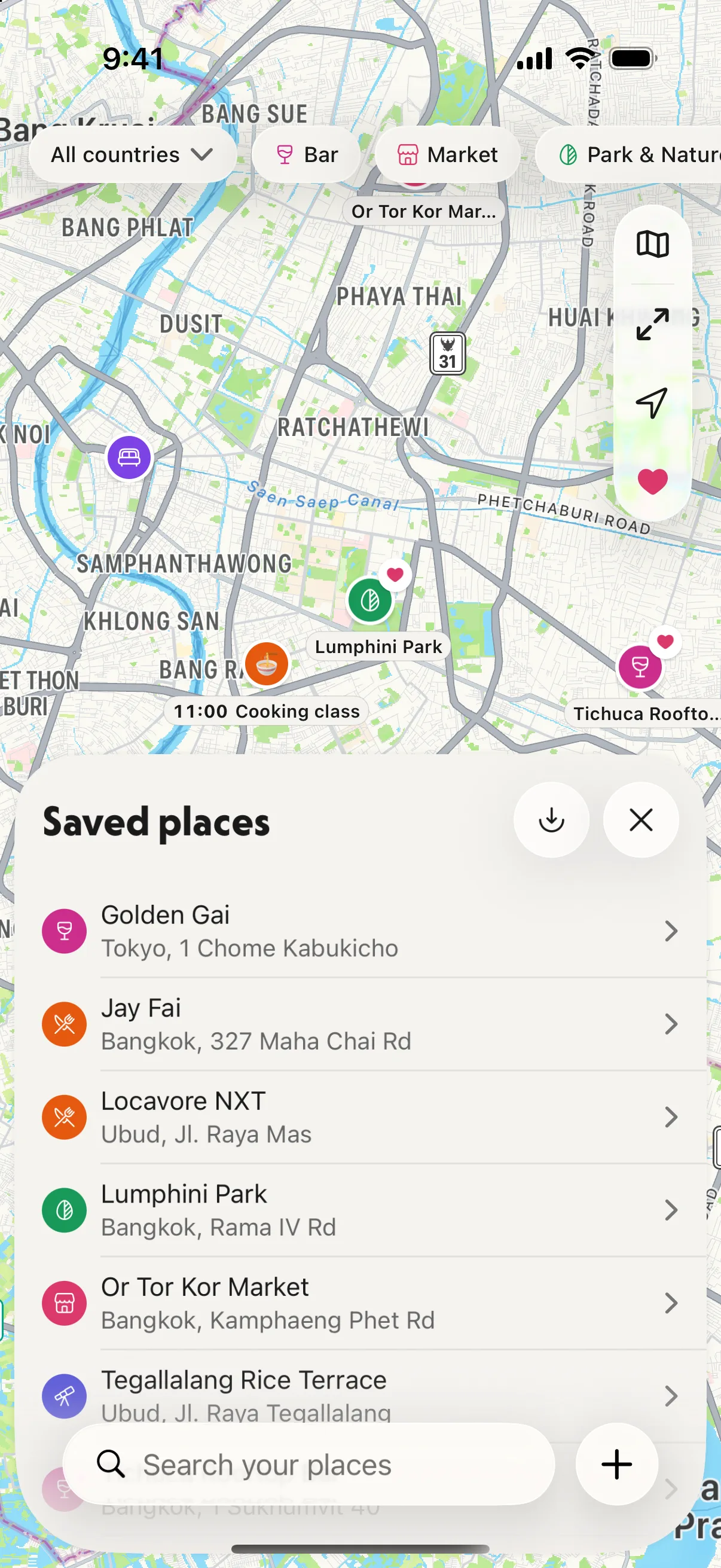
Saved places: everything you want to see, on the map, across the whole trip.
To bring places in, paste the share link of a Google Maps list or a Wanderlog plan, or type a list of names, one per line. It's free.
Then each day of the trip gets its own page and its own map, with the stops in order and the walking time between them.
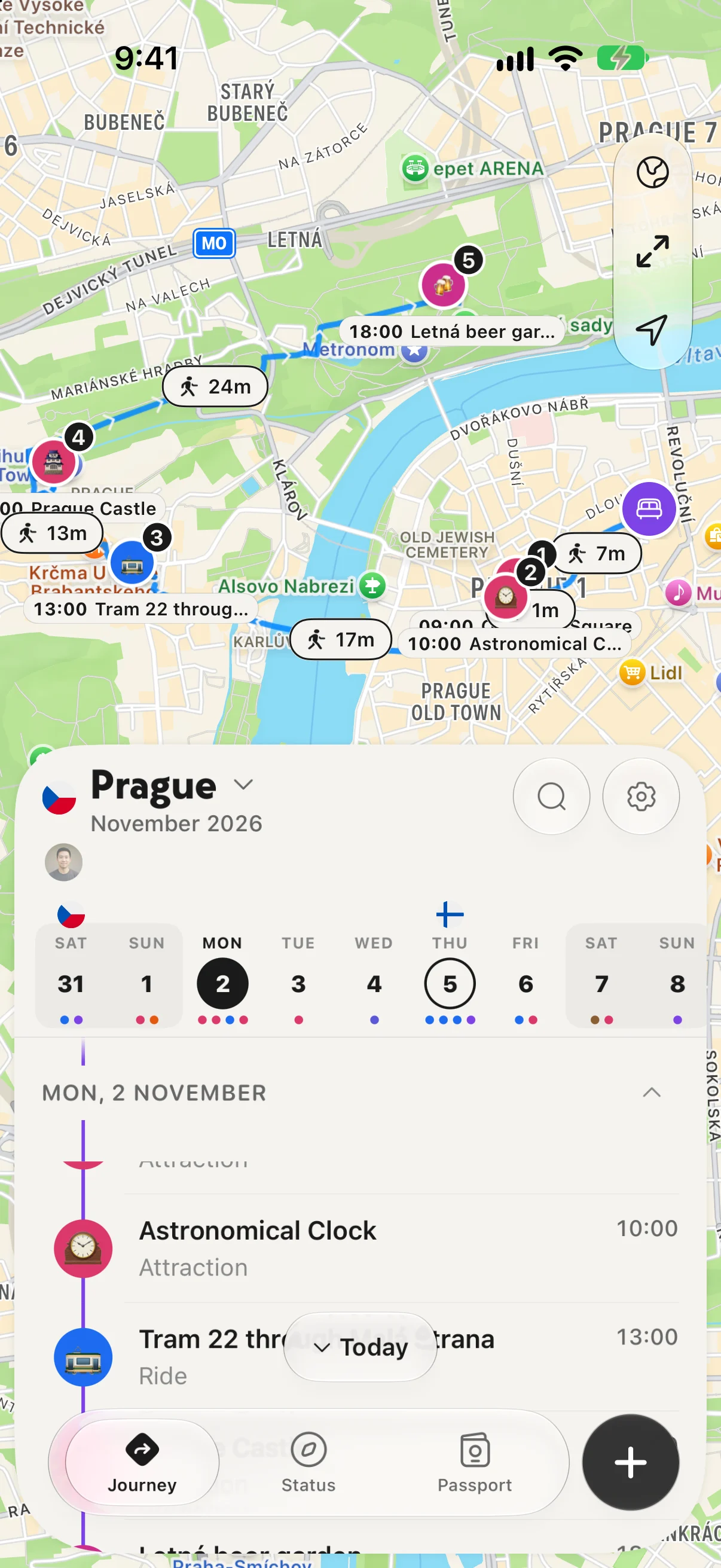
A day in Prague: the plan below, the route on the map above.
Flights, stays and activities live in the same journey, and the whole itinerary is saved offline on the free plan.
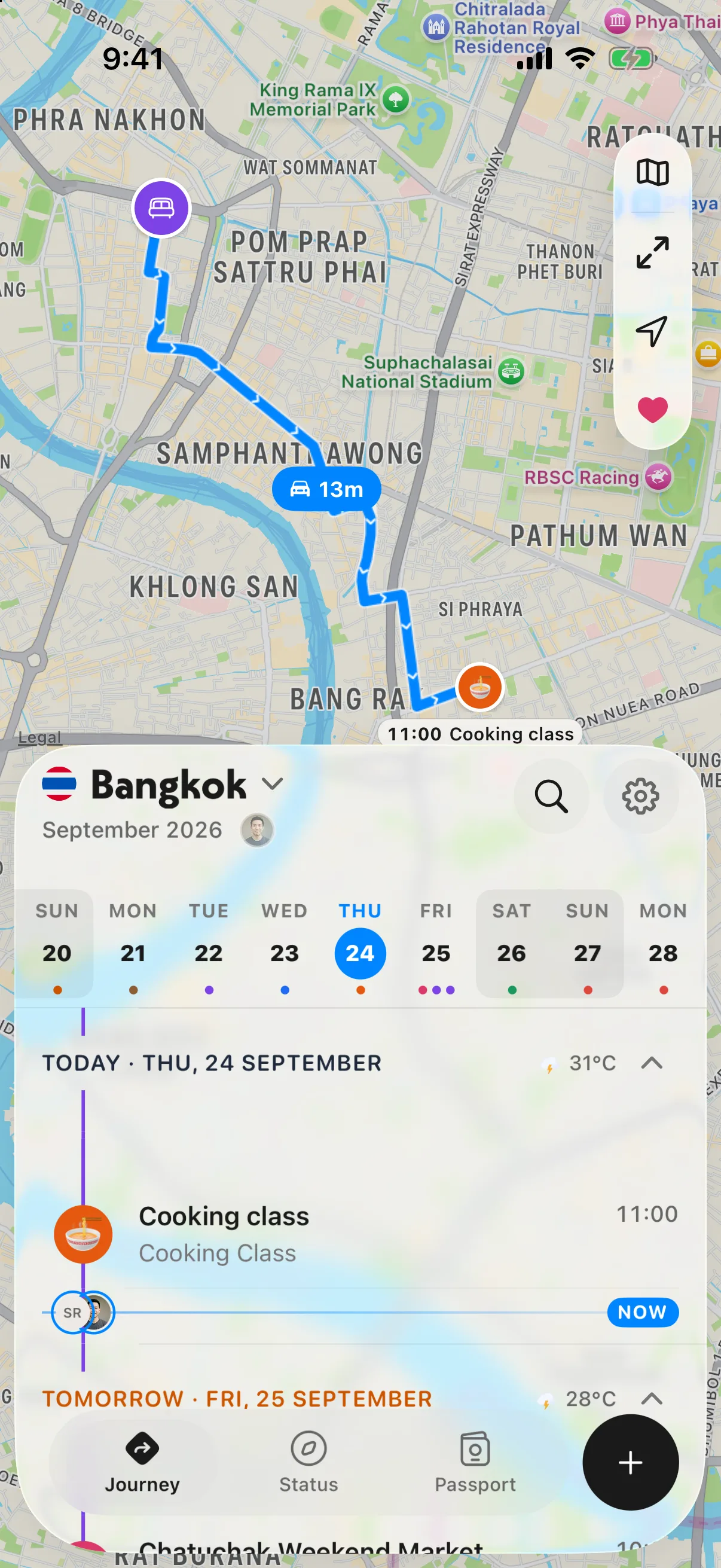
Today in Bangkok: where you are staying, where you are going next, and how long it takes.
Where it falls short, honestly:
- No turn-by-turn navigation. Keep Google Maps for that.
- No Android app and no web app. If you plan on Android or in a browser, Wanderlog fits better.
- With Pro ($39.99 a year, 7-day free trial, or $7.99 a month), you also get the best order for a day's stops, flight alerts, and entry rules for every country. See pricing.
For more, read NomadPoint vs Wanderlog, is Wanderlog Pro worth it, the best app to organise a travel itinerary and trip planner app vs spreadsheet.
Frequently asked questions
Is Wanderlog better than Google Maps for trip planning?
For an itinerary, yes: Wanderlog orders places by day and holds flights and hotels, which Google Maps lists don't. For saving places and navigating, Google Maps is better and completely free. Many people use both: plan in Wanderlog or NomadPoint, navigate in Google Maps.
Wanderlog vs Google My Maps: which is better?
My Maps is better for a custom, shareable map built on a computer, with layers and up to 10,000 places. Wanderlog is better for a day-by-day plan on your phone with bookings, budgets and directions between stops. For what replaced Google Trips, see TripIt vs Google Travel.
Does Google Maps work offline for a trip?
Yes, for downloaded areas, with driving directions only. Google says transit, cycling and walking directions aren't available offline. Wanderlog's offline access needs Pro; NomadPoint keeps the whole itinerary offline for free.
Can I move my Google Maps list into a trip planner?
In NomadPoint, paste the list's share link and the places become saved places on your trip's map. Wanderlog Pro goes the other way: it exports your Wanderlog places to Google Maps.
What about Polarsteps vs Google Maps?
They solve a different problem. Polarsteps records the route you travel and turns it into a travel log you can share, while Google Maps Timeline saves your visits privately once you turn it on. Read our Polarsteps vs Wanderlog comparison for more.
Your saved places, in the order you'll see them. NomadPoint turns a list of places into a day-by-day plan on a map, offline. Free to download.
Elad · Founder of NomadPoint
I build NomadPoint and write these guides. Spot something wrong or out of date? Write to me at support@nomadpoint.app.