Best Travel Journal App for iPhone (2026): 5 Picks
The best travel journal and travel log apps for iPhone and iPad: NomadPoint, Polarsteps, Day One, Journi and Apple Journal, compared on price and devices.
 By Elad · Nov 24, 2026 · 6 min read
The best travel journal app for iPhone is NomadPoint (we make it), if you want a travel log that writes itself. You plan the trip in it, and the same journey becomes your record afterwards: every flight, stay and activity, day by day on a map, with your countries and days abroad counted for you.
If you want a photo diary with long written entries, pick a dedicated journal app instead. Polarsteps tracks your route and prints photo books. Day One is the strongest pure diary.
The short answer:
- Best overall travel log: NomadPoint. The plan becomes the log, on iPhone, iPad, Mac and Apple Watch. Free plan included.
- Best for tracking your route with photos: Polarsteps. Automatic route tracking and printed Travel Books. Also on Android.
- Best private diary: Day One. Written entries, photos, a map of where you wrote, end-to-end encryption.
- Best for photo books: Journi. Turns trip photos into a book.
- Best with nothing to install: Apple's own Journal app on iPhone and iPad.
App details below come from each app's US App Store listing and official site, checked on 24 November 2026.
What is a travel journal app?
A travel journal app keeps a record of a trip. Some are diaries: you write entries and add photos. Others are travel logs: they record where you went, when, and how you got there.
The main difference is who does the writing. In a diary app, you do. In a travel log built from your bookings, the app does most of it for you.
How the five apps compare
| App | How the record gets made | Devices | Price (US) |
|---|---|---|---|
| NomadPoint | From the flights, stays and activities you plan | iPhone, iPad, Mac, Apple Watch | Free; Pro $39.99 a year |
| Polarsteps | Tracks your route; you add steps and photos | iPhone; Android | Free; Plus $34.99 a year or $9.99 a month |
| Day One | You write entries, with photos, audio and video | iPhone, iPad, Mac, Apple Watch; Android | Free (1 photo per entry, 1 device); Silver $49.99 a year |
| Journi | Your photos, arranged into a timeline and book | Phone, tablet, computer | Free app; you pay for printed books |
| Apple Journal | You write entries; suggestions from your iPhone | iPhone, iPad | Free |
Sources: App Store listings for NomadPoint, Polarsteps and Day One; NomadPoint pricing; Day One pricing; Journi; Apple Journal; Google Play for Polarsteps and Day One.
1. NomadPoint: the travel log that builds itself
NomadPoint is a trip planner for iPhone, iPad, Mac and Apple Watch. You keep flights, stays and activities in one journey, and it checks the whole trip (flights, stays and borders) before something breaks. When the trip is over, nothing gets thrown away. The plan you travelled with is your travel log.
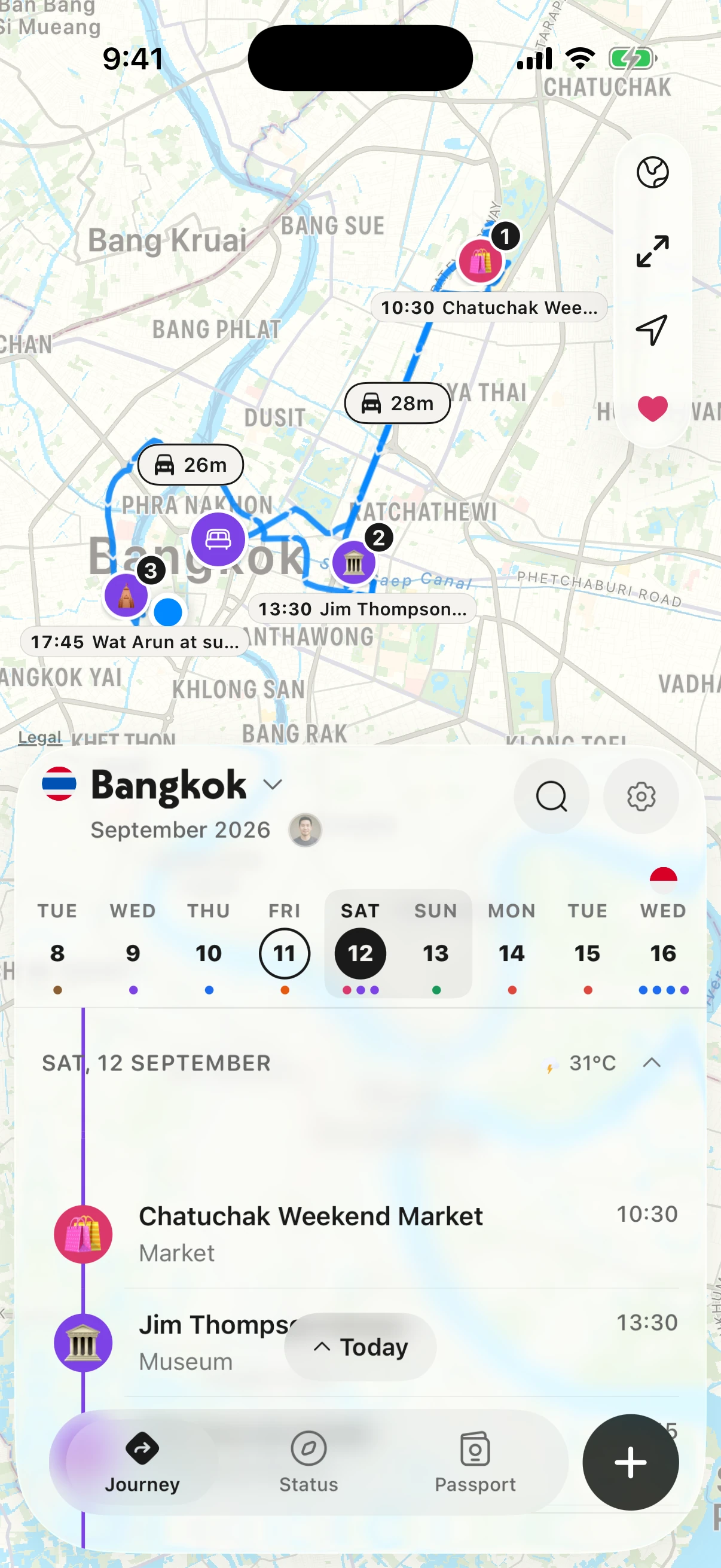
One day of a journey, on the map and in time order. After the trip, this is the record of where you went and when.
Here's what you keep from each trip:
- Every day in order. Flights, stays and activities on a timeline, and on a map.
- Your travel stats. The Passport tab counts countries, continents, cities, days abroad, flights and airports from your journeys, on the free plan.
- What you spent. Expenses you record, with totals per journey.
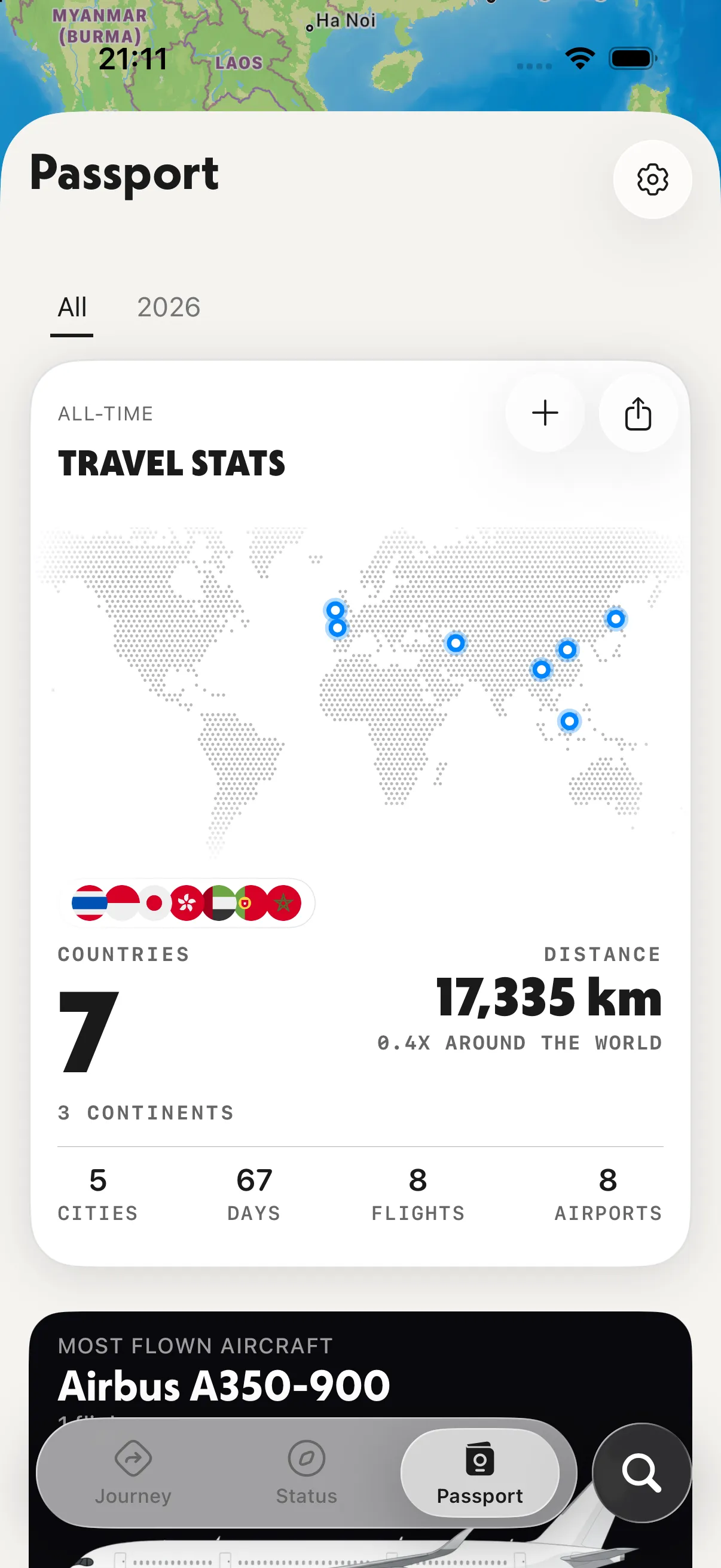
The Passport tab: your countries, cities, days and flights, counted from the trips you saved.
You don't have to type the trip in. Forward a booking email and it lands in the journey (the first one is free). The free plan also imports your calendar once. Pro adds imports from TripIt, Tripsy and Flighty, so older trips can fill your log too.
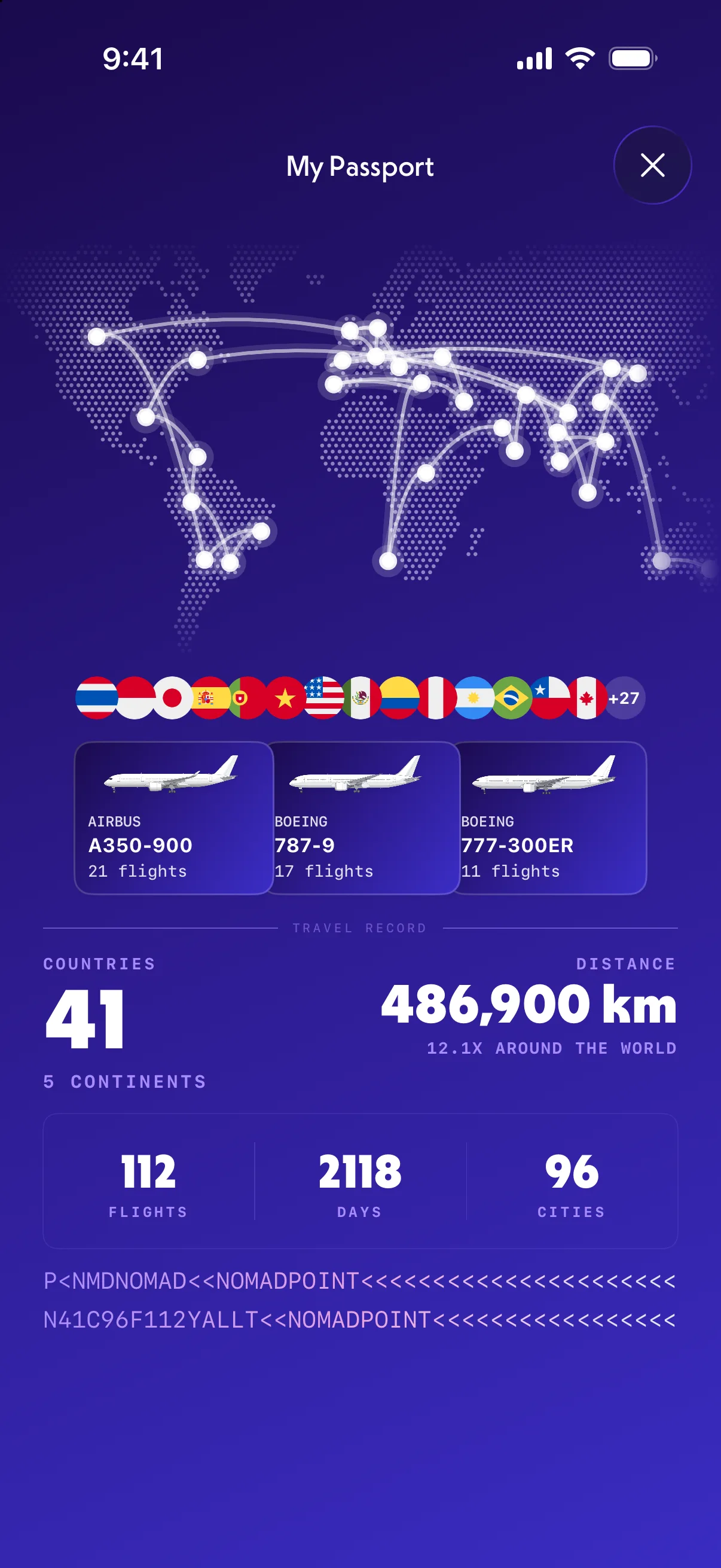
The share card: your whole travel record on one image.
Where it falls short: NomadPoint is not a diary. It has no long written entries or photo albums. It has no Android app either. For a photo diary, use Polarsteps or Day One next to it.
2. Polarsteps: route tracking and photo books
Polarsteps tracks your route on a world map as you travel. Its listing says you can turn a trip into a printed Travel Book or a short video. You add "steps" with photos and text at each place.
It's free with in-app purchases. Polarsteps Plus is $34.99 a year or $9.99 a month in the US App Store. The App Store version is for iPhone only, and there's an Android app.
Pick Polarsteps if you want a photo journal of the route, or you're on Android. Read our full Polarsteps review, or see how it compares with a planner in NomadPoint vs Polarsteps.
3. Day One: the best private diary
Day One is a general journal app that works well for travel. You can save text, photos, audio and video. A map view shows every place you wrote from. Entries are end-to-end encrypted, which means only you can read them.
The free Basic plan includes unlimited entries and journals, but only one photo per entry and one device, according to Day One's pricing page. Silver costs $49.99 a year. It runs on iPhone, iPad, Mac and Apple Watch, and on Android.
Pick Day One if you want to write. It's the best fit for long entries and for keeping a diary private.
4. Journi: photos into a printed book
Journi arranges your photos into a timeline and turns them into a printed photo book. Its site says you can make a book on your phone, tablet or computer, and it offers both iPhone and Android apps.
Pick Journi if the goal is a physical book of the trip, not a daily log.
5. Apple Journal: free, from Apple
Apple's Journal app is free on iPhone and iPad. You write entries and add photos and places. Its listing says it suggests moments to write about, such as outings and photos, and a Places view shows where you wrote each entry.
Pick Apple Journal if you want a simple free diary and don't need a Mac.
Which one should you use?
- You want the record without the homework: NomadPoint. Plan the trip and the log follows.
- You want your route and photos on a map, or you use Android: Polarsteps.
- You want to write a real diary: Day One.
- You want a printed book: Journi or Polarsteps.
- You want free and simple: Apple Journal.
Many travellers use two: NomadPoint for the plan and the log, and a diary app for the words and photos.
For more planner picks, read the best travel planning apps and the best travel apps for iPhone. If counting countries is the main point, see the best app to track countries visited.
Frequently asked questions
What is the best free travel journal app for iPhone?
NomadPoint, for a travel log: your journeys, stats and spending are on the free plan. For a written diary, Apple Journal is free, and Day One has a free plan with one photo per entry.
What is the best travel log app?
NomadPoint. It logs each trip from your flights, stays and activities, and counts your countries, cities, days and flights. Polarsteps is the pick if you want your GPS route drawn on a map.
Is there a good travel journal app for iPad?
Yes. NomadPoint and Day One both run on iPad as well as iPhone and Mac. Apple Journal runs on iPhone and iPad. Polarsteps is iPhone only in the App Store.
What is the best travel journal app for Android?
Polarsteps or Day One. Both have Android apps on Google Play. NomadPoint is on Apple devices only.
Is there a travel journal app for kids?
None of these is made for children. Polarsteps and Journi are the easiest to use, since they work mostly from photos. A parent should set up the account.
Your next trip, already logged. NomadPoint keeps flights, stays and activities in one journey, warns you before something breaks, and keeps the whole trip as your record. Free to download.
Elad · Founder of NomadPoint
I build NomadPoint and write these guides. Spot something wrong or out of date? Write to me at support@nomadpoint.app.