Best Travel Apps for iPhone (2026): The Essential Kit
The best travel apps for iPhone, by job: plan the trip, track flights, offline maps, translation, eSIM data and documents. Prices checked November 2026.
 By Elad · Nov 23, 2026 · 7 min read
The best travel app for iPhone is NomadPoint (we make it). It holds the plan: flights, stays and activities in one journey, day by day on a map. It checks the whole trip, from flights to stays to borders, and warns you before something breaks. Then add a few apps for jobs it doesn't do: offline maps, translation and mobile data abroad.
Facts and prices below come from official pages checked on 23 November 2026.
This page is the whole iPhone travel kit, one app per job. If you only want to compare trip planners, read the best travel planning apps instead.
The short answer
- Plan the trip and organize it: NomadPoint. Free, with Pro for live flight changes.
- Track flights: NomadPoint Pro for the flights in your trip, or Flighty if flying is your main worry.
- Maps offline: Google Maps, with the area downloaded before you go.
- Translate: Apple's Translate app or Google Translate, with the language downloaded.
- Mobile data abroad: an eSIM app such as Airalo.
- Documents: NomadPoint for your passport, Apple Wallet for boarding passes.
The key idea: one app holds the plan, and the others do single jobs around it. Most people get into trouble when the plan is spread across five apps and none of them sees the whole trip.
The iPhone travel kit at a glance
| Job | NomadPoint | Best other app | Other app's price |
|---|---|---|---|
| Plan the trip | Yes, free | Wanderlog | Free, Pro optional |
| Track flights | Live changes with Pro | Flighty | Free, Pro $59.99 a year |
| Maps offline | Your itinerary offline | Google Maps | Free |
| Translate | No | Apple Translate, Google Translate | Free |
| Data abroad (eSIM) | No | Airalo | Free app, plans from $4 |
| Documents | Passport free, more with Pro | Apple Wallet | Free |
NomadPoint is free. NomadPoint Pro is $39.99 a year with a 7-day free trial, or $7.99 a month (see pricing).
1. Plan the trip: NomadPoint
A trip planner is the app where the whole trip lives. NomadPoint puts flights, stays and activities in one journey and lays each day out on a map. It runs on iPhone, iPad, Mac and Apple Watch, and your whole itinerary works offline.
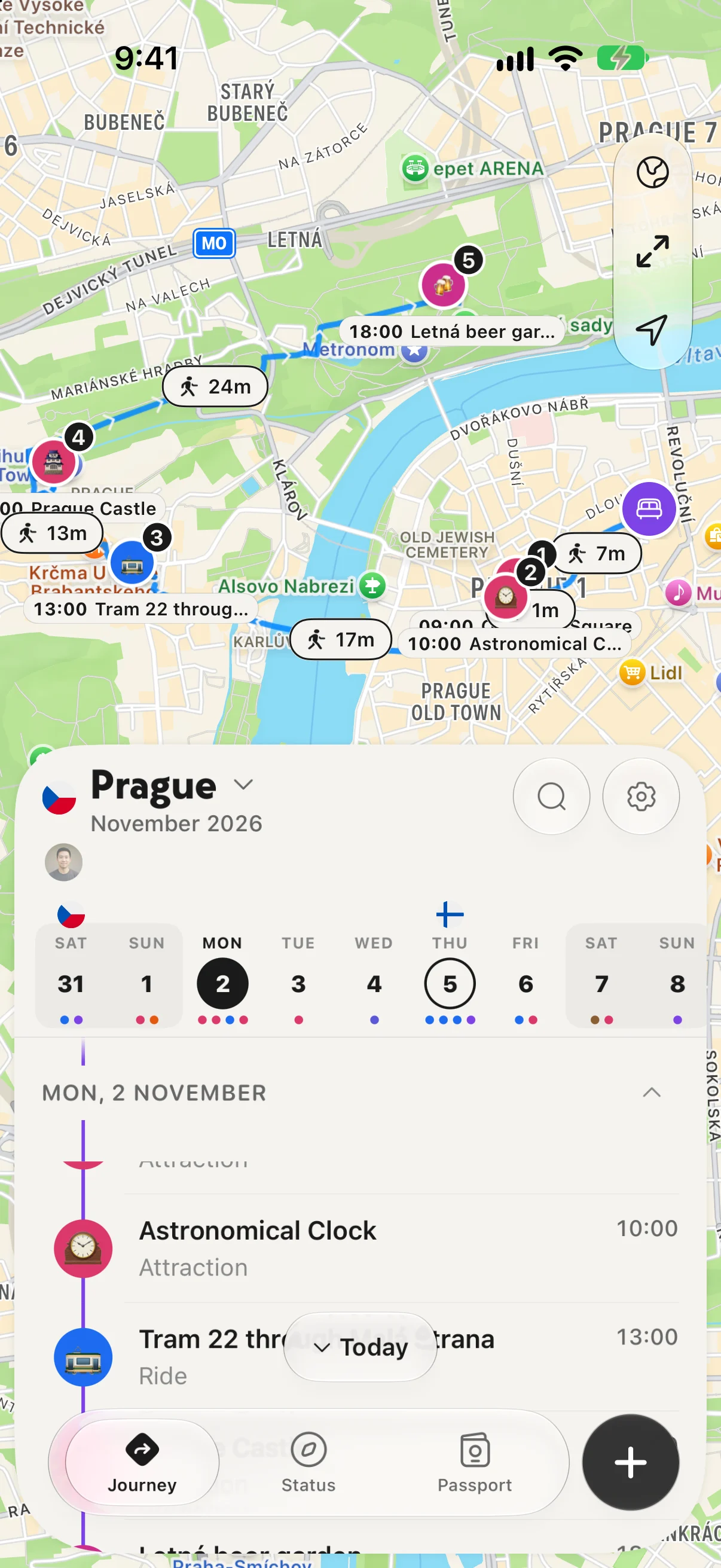
One day in Prague: the stops in order, walking times and the timeline.
You don't have to type every booking in. Forward a confirmation email and it lands in the journey (the first one is free, the rest with Pro). A one-time calendar import is free. Pro also imports from TripIt, Tripsy and Flighty.
The part other planners skip: NomadPoint already knows your next step. The Status screen shows what's next, when check-in opens, and whether you meet the entry rules for where you're going.
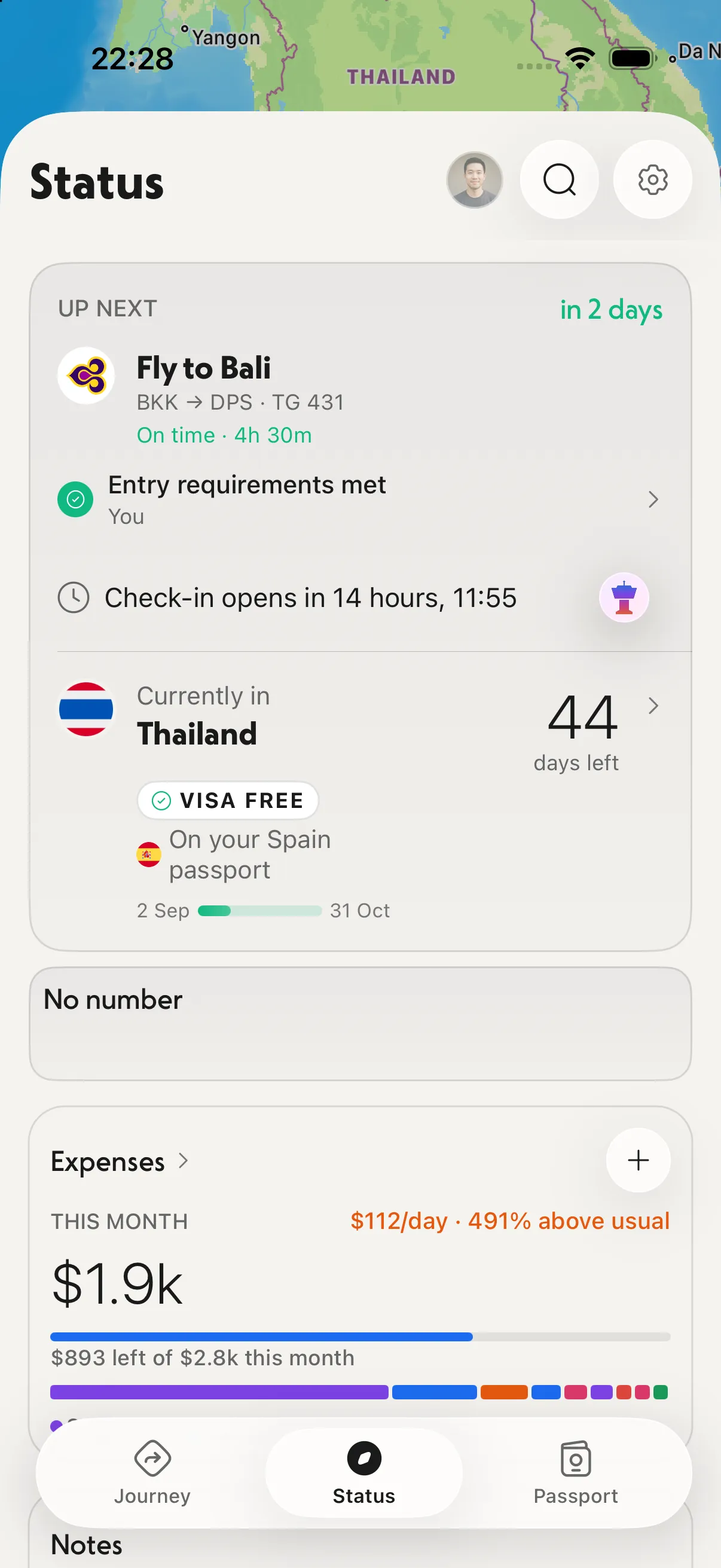
Status: the next flight, check-in, entry rules and days left in one place.
Entry rules and days left are free for one destination and cover every border with Pro. That includes the Schengen 90/180 rule, which allows 90 days in any 180-day window.
Where it doesn't fit: NomadPoint has no Android app. On Android, use Wanderlog or TripIt.
2. Track flights: NomadPoint Pro or Flighty
With Pro, NomadPoint sends delays, gate changes and cancellations as they happen. On travel days, your flight sits in a Live Activity on the Lock Screen. Extended flight info shows your aircraft, where your plane is now, the usual gate and the baggage belt.
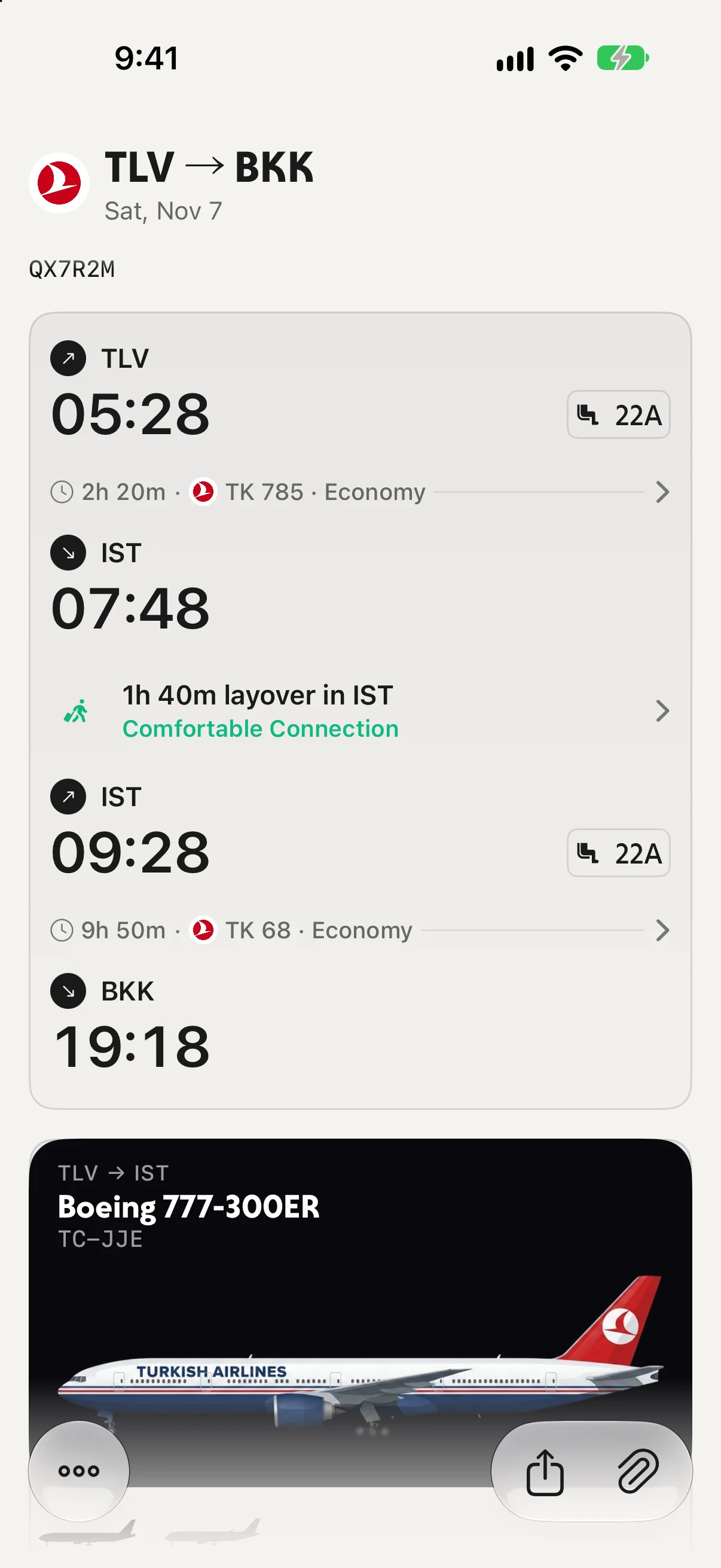
A flight with a connection: both legs, the layover and the aircraft.
Flighty is the pick if flights are the stressful part of your travel. The free version includes unlimited flight tracking. Pro adds early disruption alerts, Live Activities and delay forecasts, at $59.99 a year or $4.99 a month. Its App Store listing says Pro is free on your first flight. We compared both in the best app to track flight delays.
3. Maps offline: Google Maps
Download the area before you leave Wi-Fi. Google's offline maps help page says offline maps can guide you "as long as the entire route is within the offline map".
Three limits to know:
- Offline, you only get driving directions. Transit, cycling and walking directions are not available.
- You won't see traffic or alternate routes.
- Downloaded maps expire. Google Maps tries to update them on Wi-Fi when they are within 15 days of expiring.
For road trips, that makes Google Maps a solid free choice for the drive itself. For planning the stops, see how to plan a road trip.
4. Translate: Apple Translate or Google Translate
Both work without a connection once you download a language.
- Apple's Translate app: type or speak a phrase and it translates it. Apple's iPhone User Guide says you can "download languages to translate entirely on your iPhone, even without an internet connection".
- Google Translate: Google's help page says downloaded languages let you "translate them without an internet connection". It suggests downloading on Wi-Fi.
5. Data abroad: an eSIM app
An eSIM is a SIM card built into your phone, so you can add a data plan without a plastic card. Apple's eSIM travel guide says you need an iPhone XS, XS Max, XR or later, and the phone must not be locked to a carrier. Supported models can keep two eSIMs active, so your home number stays on while a travel plan handles data.
Airalo is an eSIM app for travel data. The app is free. Its listing claims coverage in 200+ destinations, with local plans starting at $4. Before you buy, check whether your own carrier already includes roaming.
6. Documents: NomadPoint and Apple Wallet
NomadPoint stores your passport for free and checks it against the entry rules for where you're going. With Pro, visas, insurance and boarding passes sit next to it, and you can add a second passport.
For the boarding pass itself, Apple Wallet is the simple choice. Apple's boarding pass guide says you tap Add to Apple Wallet in the airline's app or email, and the pass also appears on a paired Apple Watch. If the button isn't there, the airline may not support it. More options are in the best travel document app.
What about apps like TripIt or Wanderlog?
If you came here looking for a TripIt or Wanderlog replacement, the answer depends on what you use them for.
- For bookings in one itinerary, NomadPoint and TripIt both take forwarded emails. NomadPoint adds a day-by-day map and entry rules. See TripIt alternatives.
- For planning places on a map, NomadPoint lays out each day on a map, and Wanderlog is strong at the same job. See Wanderlog alternatives.
Moving off Google's travel tools too? Read the best Google Travel alternative.
FAQ
What are the best travel apps for iPhone?
NomadPoint to plan and hold the trip, Google Maps for offline maps, Apple Translate or Google Translate for languages, and an eSIM app such as Airalo for data. Add Flighty if you fly often and want a dedicated flight tracker. Apple Wallet holds your boarding passes.
What are the most useful apps for international travel?
NomadPoint first, because it checks the entry rules for your passport and warns you before a visa or stay allowance runs out (Pro). After that, an eSIM app for data, a translator with downloaded languages, and offline maps.
What is the best travel app like TripIt?
NomadPoint, if you are on iPhone. You forward booking emails the same way, and it also lays the days out on a map and checks your borders. Pro imports your TripIt trips. On Android, TripIt is still the safer choice.
What is the best travel app for road trips?
NomadPoint to keep the stays and stops in order, day by day, and Google Maps for the drive. Download the area first, because offline Google Maps only gives driving directions when the whole route is inside the downloaded area. Our guide to planning a road trip covers the rest.
What travel apps does Reddit recommend?
Threads change often, so we don't quote them here. The same jobs come up again and again, though: a planner, offline maps, translation, data abroad and flight tracking. This page gives one pick for each, with the facts checked on official pages.
Your whole trip, checked before it breaks. NomadPoint holds the plan and already knows your next step. Free on iPhone, iPad, Mac and Apple Watch.
Elad · Founder of NomadPoint
I build NomadPoint and write these guides. Spot something wrong or out of date? Write to me at support@nomadpoint.app.