Boarding Pass on iPhone: Apple Wallet and Best Apps
How to get your boarding pass on iPhone: add it to Apple Wallet, use it on Apple Watch, share or remove it, and which airports still want a paper pass.
 By Elad · Nov 23, 2026 · 6 min read
To get your boarding pass on iPhone, check in online with your airline, then tap Add to Apple Wallet in the airline's app or email. At security and the gate, open Wallet and scan the pass. Most airports accept it, but a few still want paper.
To keep that pass with the rest of the trip, use NomadPoint (we make it). It stores your boarding passes next to your passport and visas, inside the journey, and follows the flight itself: delays, gate changes and a Lock Screen Live Activity on travel days, with Pro.
The short answer:
- NomadPoint keeps the boarding pass with your passport, visas, flights and stays, and tells you when the gate or time changes.
- Apple Wallet holds the scannable pass, if your airline supports it.
- Your airline's app is where the pass comes from, and the fallback if your airline doesn't offer Wallet.
Facts below come from official pages checked on 23 November 2026.
How mobile boarding passes work
A mobile boarding pass is the pass you'd print, shown on your phone. The scanner reads its barcode or QR code.
The chain is simple: you check in with the airline, the airline issues the pass, and you keep it in the airline's app or add it to Apple Wallet. Ryanair, for example, says that after you check in, your pass "will appear automatically in your Ryanair App" (Ryanair).
How to add a boarding pass to Apple Wallet
Apple's steps (Apple Support):
- Open the app, email or message that has your boarding pass.
- Tap Add to Apple Wallet.
- Follow the instructions on screen.
- If asked, tap Add in the top-right corner.
You need Face ID or Touch ID turned on. If you don't see the Wallet button, Apple says to contact your airline to check that it supports boarding passes in Wallet.
How to use your boarding pass on your phone
- Open Wallet. On an iPhone with Face ID, double-click the side button. With Touch ID, double-click the Home button.
- Tap your boarding pass.
- Scan it at the reader, or show it to the agent.
Boarding pass on Apple Watch
A pass you add on iPhone also appears on your paired Apple Watch. Open it, then scan the watch display or show it to the agent. You may need to unlock the watch first (Apple Support). For other watch apps on a trip, see the best Apple Watch travel apps.
How to share a boarding pass in Apple Wallet
Apple lists two ways (Apple Support):
- Share the flight: open the pass, tap Share Flight Tracker and pick someone in Messages. They tap Follow to get real-time flight status updates.
- Share with an iPhone nearby: open the pass and hold your iPhone a few centimetres from theirs until both glow, then tap Share.
For other passes, Apple says that if there's no Share button, the issuer hasn't turned sharing on (Apple Support).
How to remove a boarding pass, and why it disappeared
To remove one (Apple Support):
- Open Wallet.
- Tap the boarding pass.
- Tap the More button, then Remove Pass, and confirm.
Boarding pass disappeared from Wallet? It was probably hidden, not lost. Apple hides expired passes, including boarding passes, automatically. To find it, tap More, then Expired. Tap the pass and choose Unhide. To stop this, turn off Hide Expired Passes in Wallet & Apple Pay settings.
Can I just show my boarding pass on my phone?
At most airports, yes. But not everywhere.
- easyJet lists airports that "do not currently accept mobile boarding passes", including Agadir, Antalya, Belgrade, Hurghada, Marrakech and Sharm El Sheikh. From those, it asks you to check in online and print a paper pass (easyJet).
- Ryanair moved to digital boarding passes only from 12 November 2025. Flying from Morocco, you show your digital pass at the airport to collect a printed one (Ryanair).
The key takeaway: check your airline's own list for the airport you fly home from, not just the one you leave from.
Screenshots and backups
A live pass in Wallet or the airline's app is the safest copy. A picture of it may not scan: easyJet says you "cannot use a PDF scan of your boarding pass on your mobile device" because security can't scan it (easyJet).
What helps:
- Open the pass once before you leave, so it's saved on the phone. Ryanair says its pass is available offline in its app after check-in (Ryanair).
- Charge your phone. If it dies before security, Ryanair gives a free boarding pass at the airport, as long as you checked in (Ryanair). Other airlines may charge, so check.
- Keep a screenshot as a record of your seat, booking code and gate, not as the pass you scan.
Can you print a boarding pass from the app?
It depends on the airline. easyJet says that if you lose your boarding pass "you can simply print them again", and that a printed pass must be printed in full. If you change your booking, for example adding a bag, it asks you to check in again and print a new pass (easyJet). Ryanair no longer issues paper passes for you to print: its pass lives in its app.
The best boarding pass app for iPhone
| NomadPoint | Apple Wallet | Airline app | |
|---|---|---|---|
| Scannable pass at the gate | Use your airline's pass | Yes, if the airline supports it | Yes |
| Kept in the trip with passport and visas | Yes (Pro) | No trip view | No trip view |
| Whole trip: flights, stays, activities | Yes | No | Its own flights |
| Delay and gate change alerts | Yes (Pro) | Flight status via Share Flight Tracker | Its own flights |
| Check-in reminder | Yes (Pro) | Not covered by Apple | Varies |
| Price | Free, Pro $39.99/year | Free | Free |
1. NomadPoint: the boarding pass inside the whole trip
Wallet holds the pass; NomadPoint holds the trip around it. With Pro, your boarding passes sit in the journey with your passport, visas and insurance, so everything for a border is in one place.
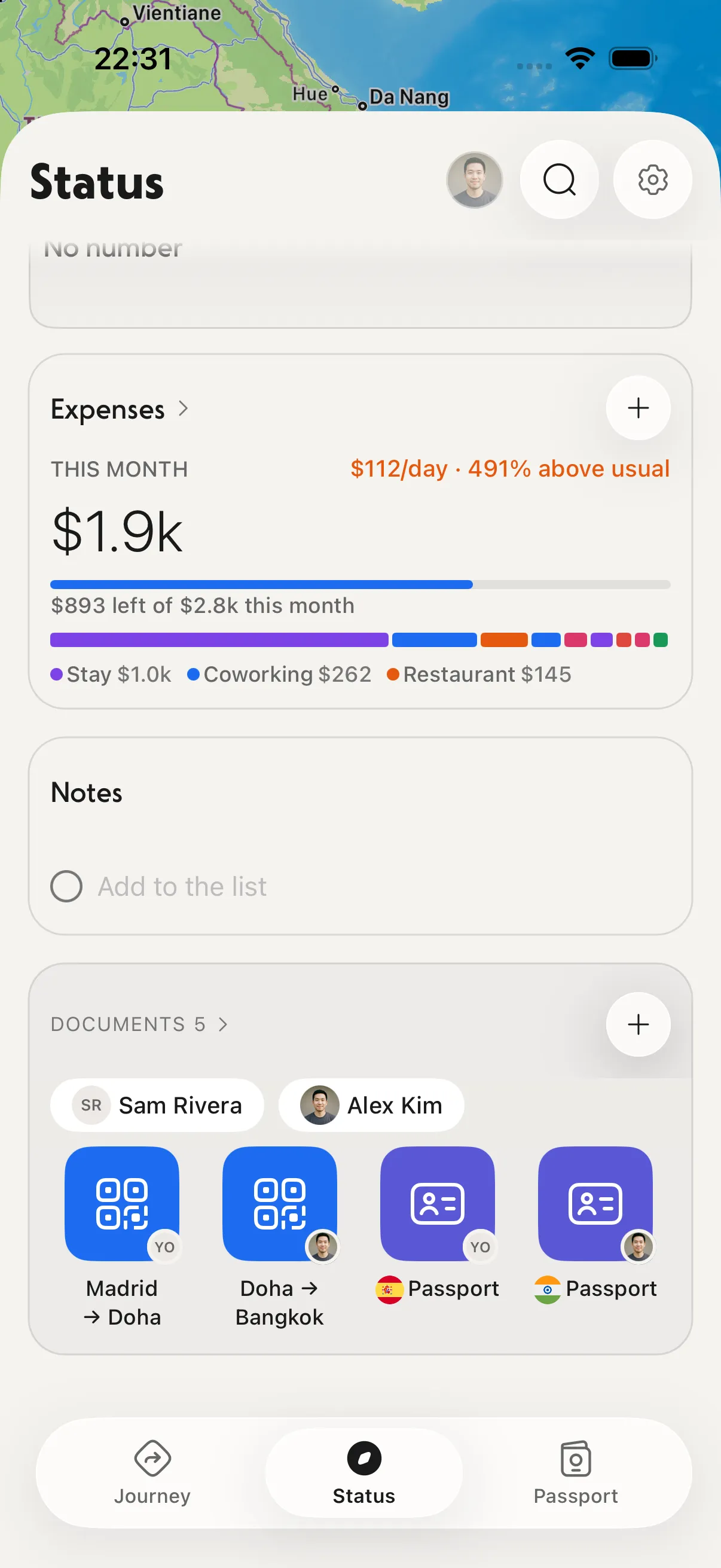
Boarding passes and passports together, in the trip.
NomadPoint also checks the whole trip, flights, stays and borders, and warns you before something breaks. On travel days with Pro, the flight sits on your Lock Screen as a Live Activity, with the terminal, gate and time to departure.
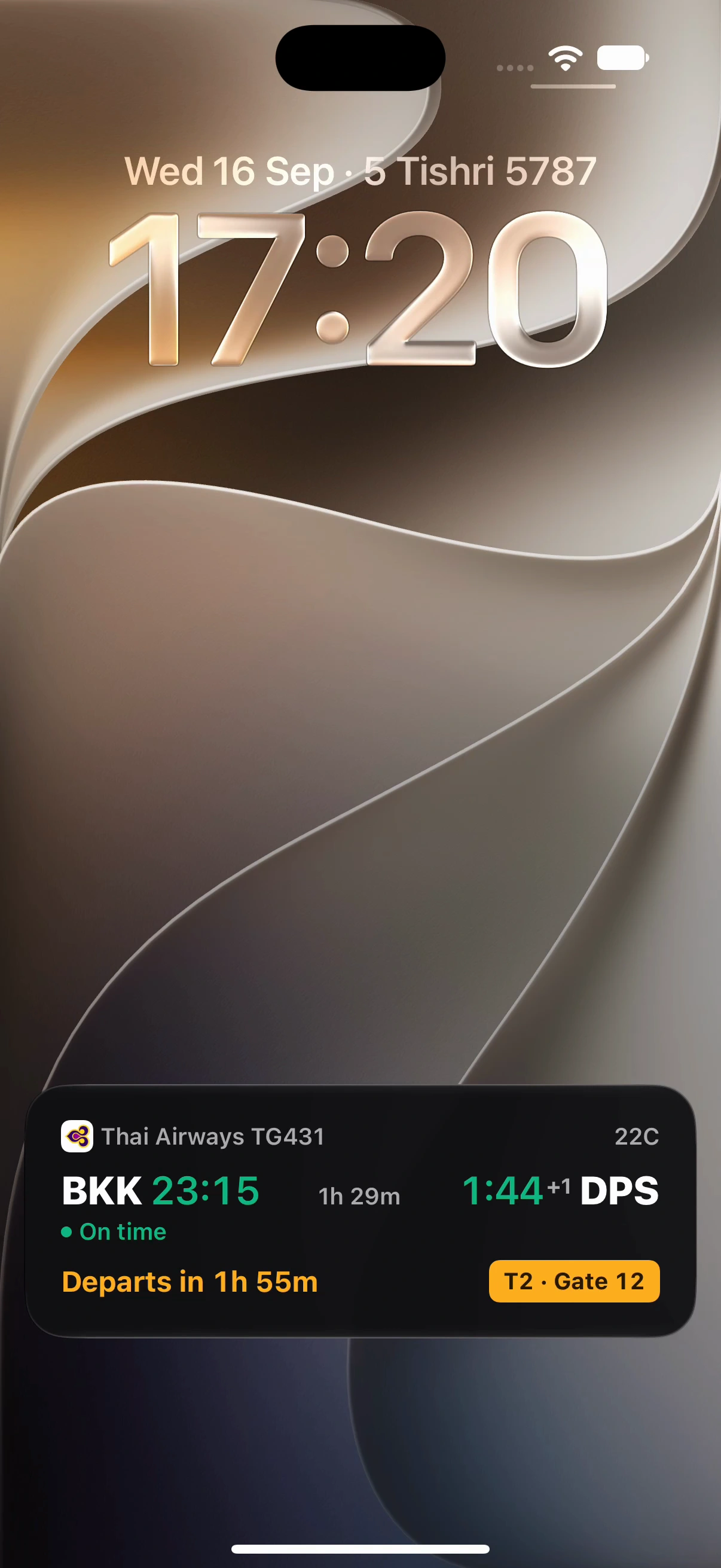
Gate, seat and time to departure, without opening an app.
If the gate moves or the flight is late, Pro alerts you, so the gate printed on your pass is never the only one you know. It also reminds you when check-in opens: see flight check-in reminders. For live tracking compared across apps, read the best app to track flight delays.
The plan is free. NomadPoint Pro is $39.99 a year with a 7-day free trial, or $7.99 a month (pricing). It runs on iPhone, iPad, Mac and Apple Watch. There's no Android app; on Android, use Google Wallet and your airline's app.
2. Apple Wallet: the pass you scan
Free, built in, and on your Apple Watch too. It depends on your airline offering Wallet passes.
3. Your airline's app
Always has your pass, even when Wallet isn't offered. The catch: one app per airline.
For where the passport and visas should live, see the best travel document app. Flying long-haul? Here's how to beat jet lag.
FAQ
What is the best boarding pass app for iPhone?
For the pass you scan, Apple Wallet or your airline's app. To keep that pass with your passport, visas and the rest of the trip, with gate change alerts, NomadPoint, with Pro.
How do I share a boarding pass in Apple Wallet?
Open the pass and tap Share Flight Tracker to send flight updates in Messages, or hold your iPhone near another iPhone to share the pass itself.
Why did my boarding pass disappear from Apple Wallet?
Wallet hides expired passes automatically. Tap More, then Expired, to find it and tap Unhide.
Can I use my boarding pass on Apple Watch?
Yes. A pass added on iPhone appears on your paired Apple Watch. Open it and scan the watch display.
Can I print a boarding pass from the app?
Some airlines let you print after checking in online, like easyJet. Ryanair's pass is app only, though it prints one for you at airports that require paper, such as in Morocco.
Your boarding pass, passport and flight in one place. NomadPoint keeps them in the trip and tells you when the gate changes, with Pro. Free to download.
Elad · Founder of NomadPoint
I build NomadPoint and write these guides. Spot something wrong or out of date? Write to me at support@nomadpoint.app.